How to Enable PHP ZIP Extension for Ratals Updates
Author: Rob CuppettPosted On: Apr. 24, 2026Last Updated: May. 01, 2026
Ratals requires the ZIP extension in PHP to be enabled in order to install software updates correctly. When an update is triggered, Ratals downloads a compressed update package and uses the ZIP functionality to extract and install it on your server.
If the ZIP extension is not enabled, the update process will fail to start. This guide will walk you through how to enable ZIP support depending on your server setup.
If your hosting provider uses cPanel, enabling the ZIP extension is usually quick and does not require any command line access.
First, log in to your hosting provider's website. Most hosting companies will take you to your account dashboard rather than directly into cPanel. Look for an option such as "Login to cPanel" or "Access Control Panel" within your account area.
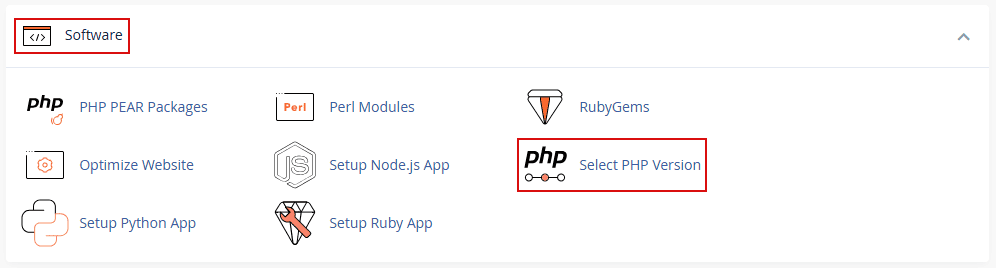
Once inside cPanel, you will see various sections such as Email, Domains, Databases, and more. You are looking for the Software section.
Inside the Software section, click on "Select PHP Version" (this may also be labeled slightly differently depending on your host).
On the PHP Version page, you will see:
A dropdown to select your PHP version
A list of extensions with checkboxes
Scroll through the list of checkboxes and locate the "zip" extension. Check the box next to it to enable the extension. Once selected, you should see a message indicating that your settings have been saved.
Important: On some hosting environments, PHP extensions may reset if the server is restarted or reconfigured. If this happens, the ZIP extension may become disabled again. If Ratals detects that ZIP is missing during an update, it will notify you.
After enabling the ZIP extension, return to your Ratals admin area, refresh the page, and try running the update again.
If you do not see the "Select PHP Version" option, your hosting provider may have customized cPanel and hidden certain features. In this case, you will need to contact your hosting provider and ask them to enable the PHP ZIP extension for your account. You can provide them with this guide for reference.
Enabling ZIP functionality in Nginx
If your server is running Nginx, the process is typically more manual and requires access to your server via SSH. Most Nginx environments do not include a graphical control panel like cPanel.
To begin, connect to your server using an SSH client such as PuTTY (Windows) or Terminal (Mac/Linux). Enter your server's IP address or domain name to initiate the connection.
The first time you connect, your SSH client may ask you to trust the server. Accept the prompt to continue. You will then be asked to log in using your server credentials.
Once connected, you should see a command prompt similar to this:
Next, install the PHP ZIP extension. The exact command depends on your server setup, but common examples include:
sudo apt install php-zip
or
sudo yum install php-zip
After installation, you must restart your web server and PHP service for the changes to take effect. Common restart commands include:
Once the services have restarted, return to your Ratals installation, refresh the page, and attempt the update again. The update process should now begin successfully.
If you are unsure which commands apply to your server, or if you encounter any errors, it is best to contact your hosting provider or server administrator for assistance. They can enable the PHP ZIP extension for you quickly and safely.
Rob Cuppett is the founder and lead engineer behind Ratals, bringing over 25 years of experience in digital marketing, software development, and business automation. He shares expert tutorials, practical guides, and insights to help business owners optimize, customize, and fully leverage software solutions to grow their businesses efficiently.
Why Ratals
Start free with the CMS, then add Commerce, ERP, or AI only when you need them. Each one activates on your existing installation - no migration, no replatforming, no rebuild - ever.
See how our single-data-model architecture lets your entire business run on one connected system instead of stitching together separate software applications.