

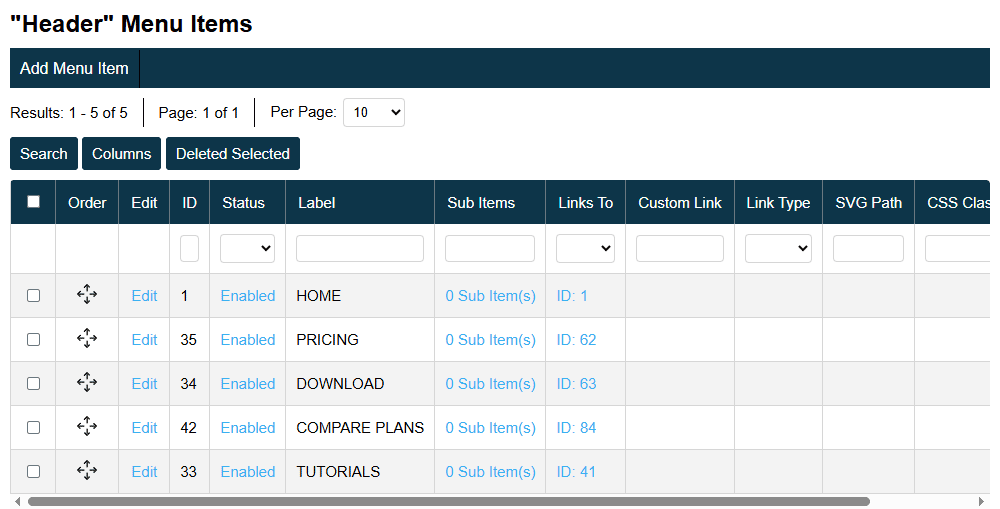
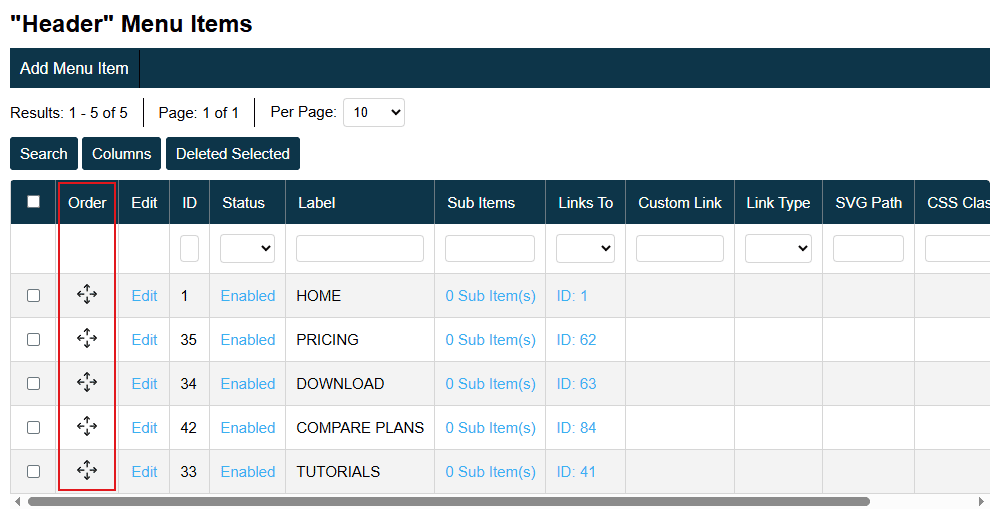
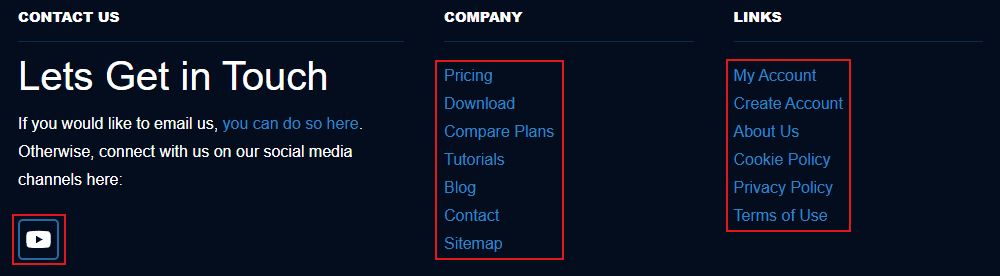
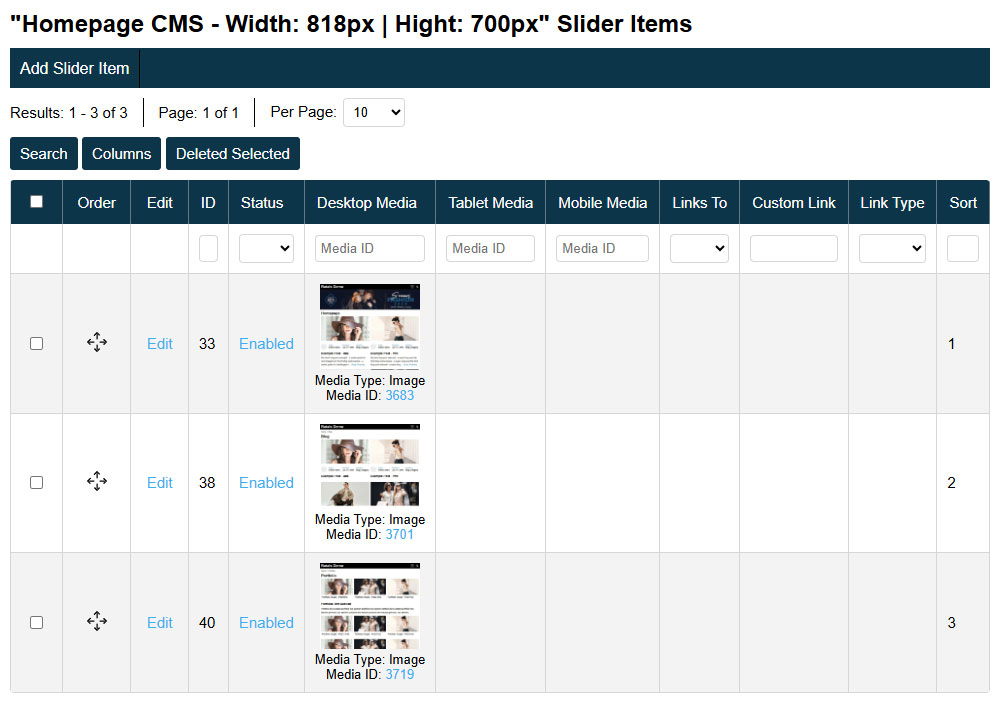
Ratals CMS Open-Source Website Builder - Create Any Type of Website

The Ratals CMS core is free and open-source, licensed under Apache 2.0. That means you can use it, modify it, and deploy it commercially - without licensing fees, restrictions, or vendor lock-in.

Built as a fully integrated platform, everything in Ratals works together out of the box. Your team gets the tools to build, manage, and scale any web experience from a single connected system - no fragmented tools, no plugin dependencies, just one system built to move as fast as you do.

Table of Contents for Ratals CMS:

Admin Interface & Data Management

Every table view inside the Ratals admin is built to put you in control of how you see and manage your data. Whether you are managing products, posts, orders, or any other record type, the interface adapts to how you want to work.

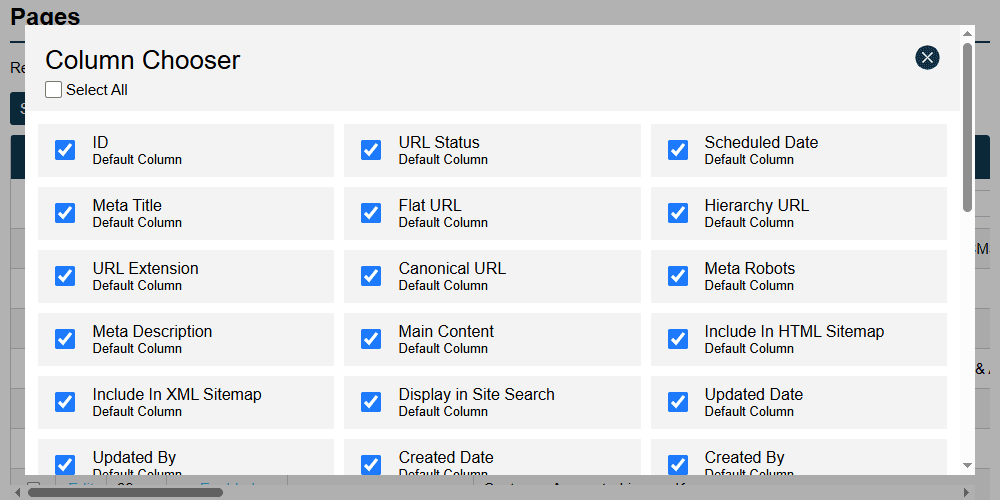
Columns can be reordered by drag and drop, and any column can be shown or hidden depending on what is relevant to you at that moment with the column chooser.

Table View Column Chooser

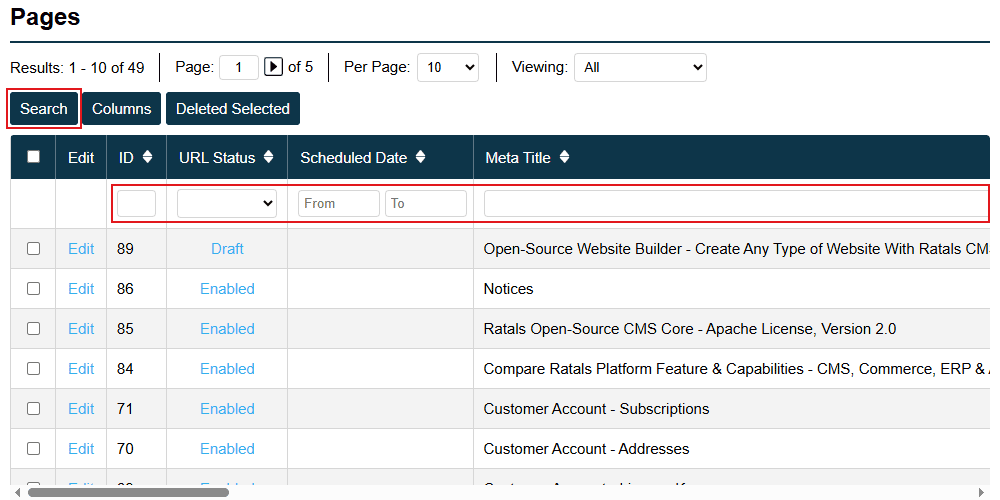
Every column connected to that table is also fully searchable, making it fast to locate exactly the record you need regardless of how much data your site holds.

Table View Search Columns

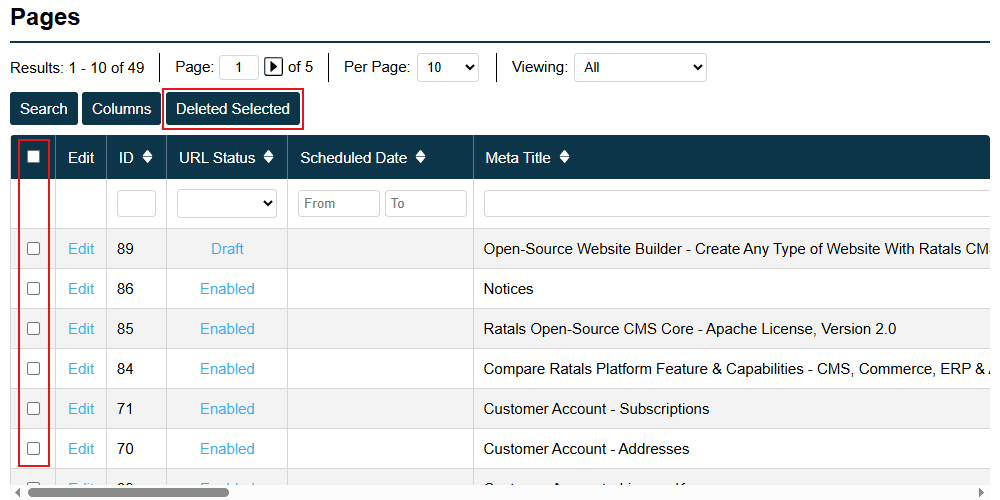
When you need to remove records, you can select multiple entries using the checkbox system and delete them in a single action — keeping data management efficient without needing developer access or database tools.

Table View Delete Rows

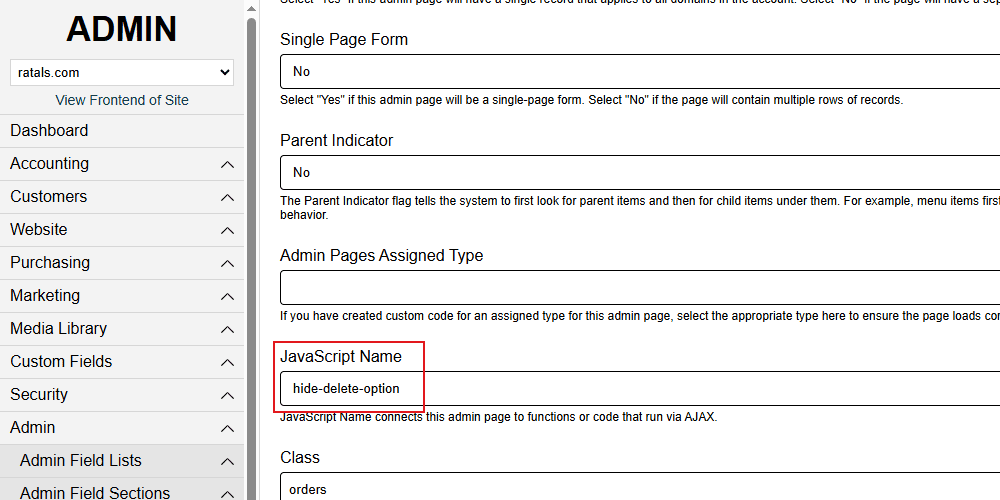
If certain records should never be deleted, you can disable deletion entirely for that admin page, removing the option altogether for that section.

Table View Disable Delete Row Option

User Permissions & Site Access

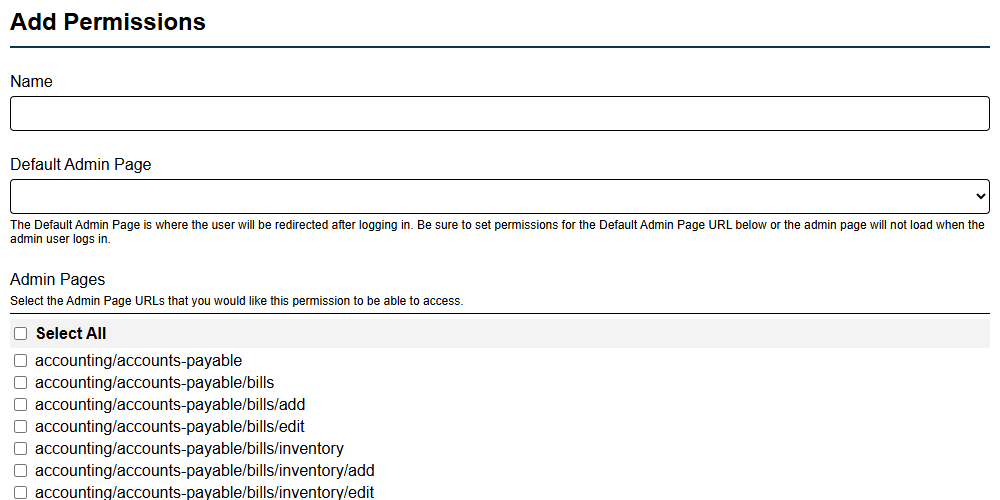
Ratals gives you precise control over what every admin user can see and do. Permission templates let you define exactly what a user can view, add, and edit across the admin — and those templates can be attached to any user account, making it straightforward to manage access as your team grows.

Admin Permissions Page Level

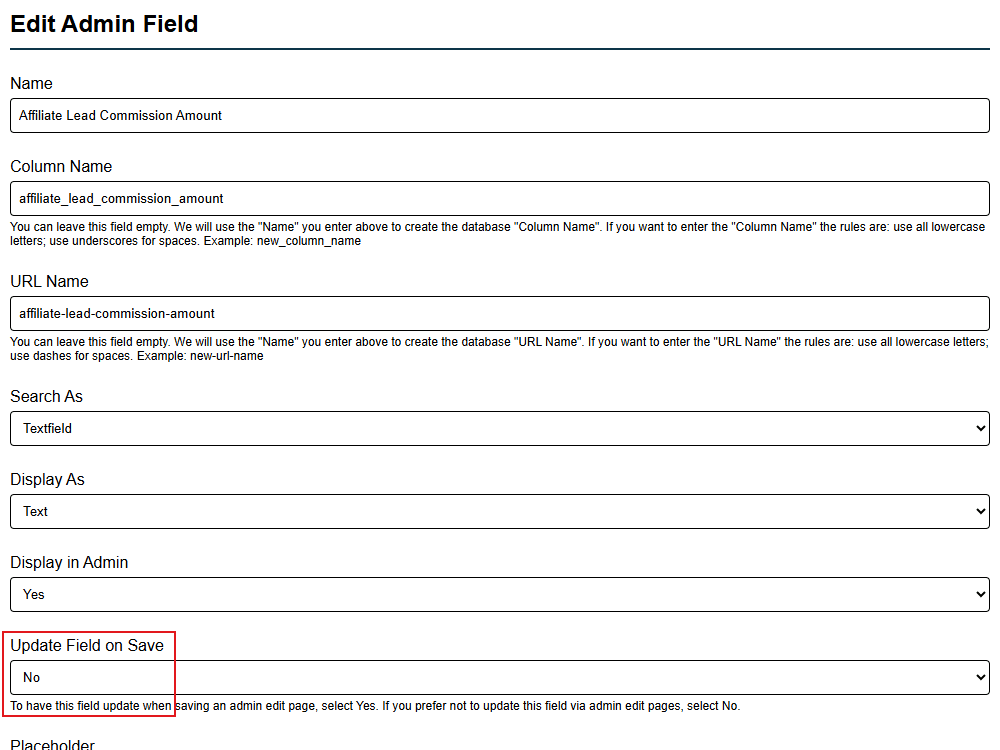
If you need tighter control, individual database columns can be locked from editing directly within the admin. This means sensitive fields stay protected at the field level without needing custom development.

Admin Permissions Field Level

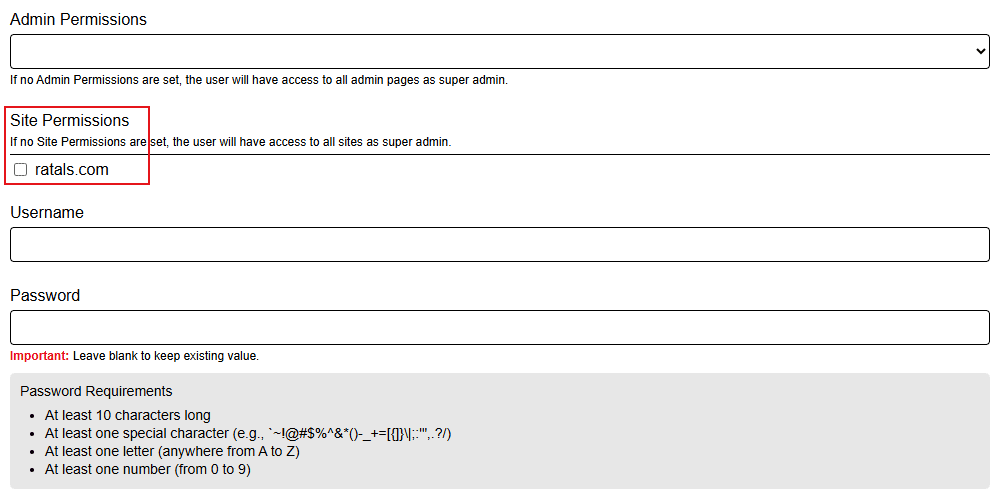
Site access works the same way. By default, a user with no restrictions can view, add, and edit across everything. When you need to limit access, you can assign a user to specific sites — so when they log in, they only see the sites they are permitted to manage. For agencies handling multiple client websites or businesses running multiple brands from one platform, this keeps every team member focused on exactly what they should be working on and nothing else.

Admin Site Access Control

Custom Database & Admin Builder

Ratals gives you the ability to create and manage your own database tables directly from the admin interface — no coding, no developer, no external database tools required.

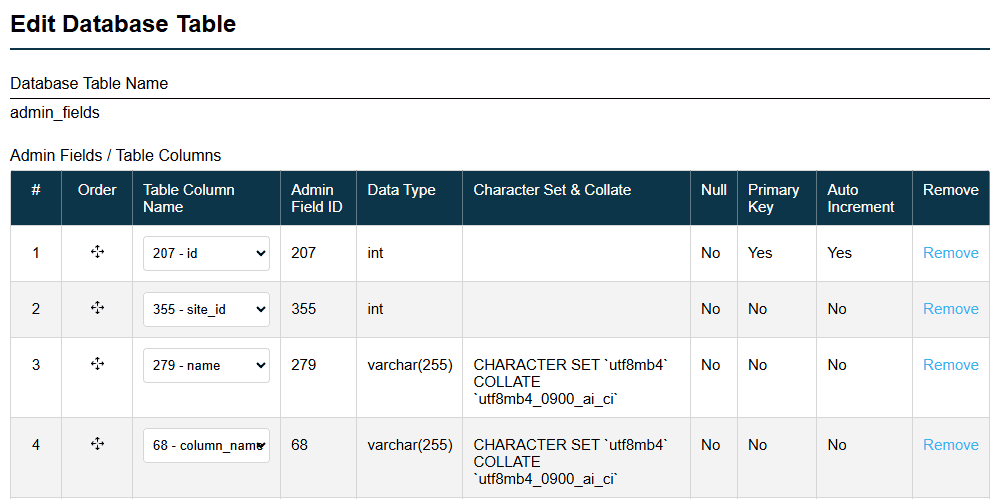
You can add, edit, and reorganise tables, and build out columns for any table you create. Each column you add is reflected immediately in the database, giving you a fully functional storage engine built entirely through the admin area. Whether you need to store custom product data, form submissions, booking records, staff information, or any other content your business requires — you can build the structure for it yourself.

Edit Database Table

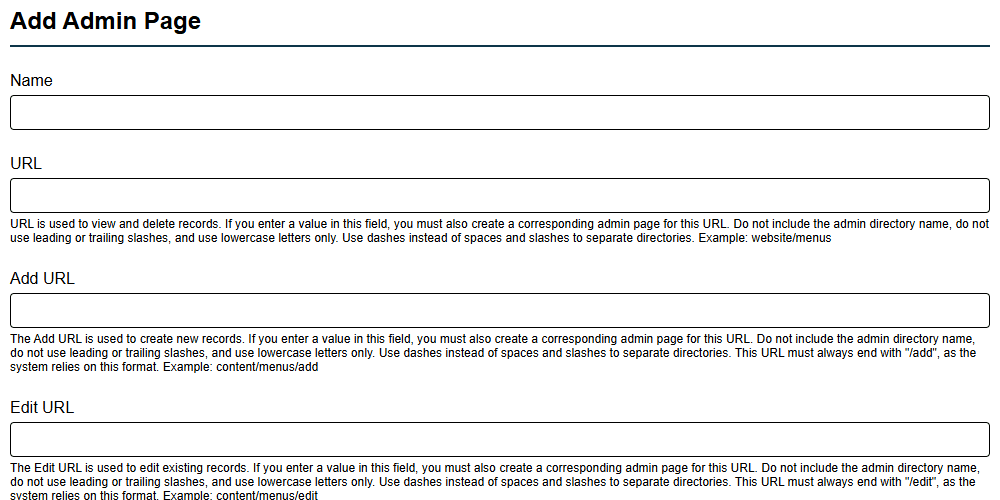
Once your table is created, you can build an admin page for it without leaving the admin area. You assign your table to the admin page you create, and Ratals automatically gives you a full table view for browsing records, an edit record view, and an add record view — all ready to use immediately.

Add Admin Page

This means any content feature you want to build has a home — both in the database and in the admin — without a single line of code written. For businesses with unique data needs or teams that want full control over their content infrastructure, this turns Ratals from a website builder into a complete application platform.

Data Import & Export

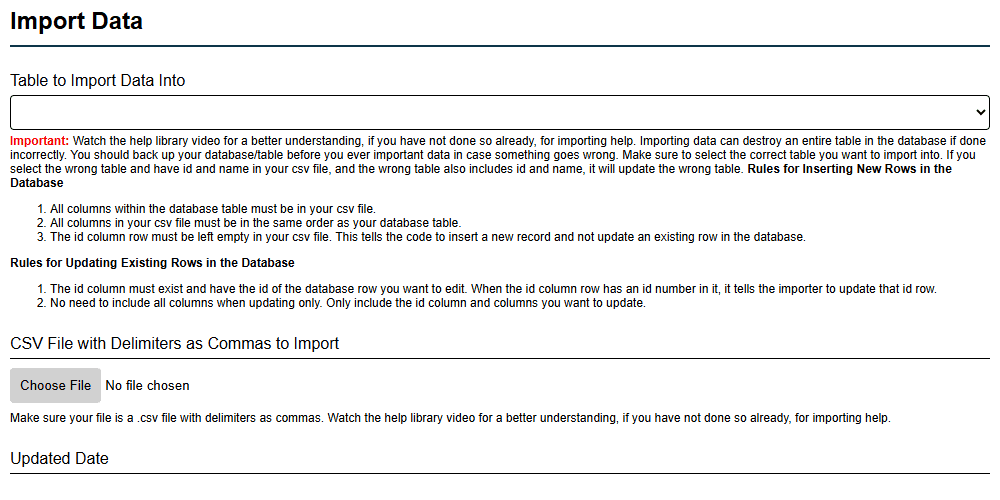
Every database table in Ratals can be exported, edited, and re-imported — giving your team a fast and reliable way to make mass updates without touching a single record manually.

Export any table to work with in Excel or any spreadsheet tool. Make your changes across as many rows as you need, then re-import the file when you are done. Only the rows and columns included in your import file will be affected, so there is no risk of accidentally overwriting data in rows or columns you did not intend to change.

Admin Import Database Data

If you need to insert new rows rather than update existing ones, export the current table to get the correct column structure, remove the existing rows, add your new records, and re-import. Ratals will treat everything in the file as new entries.

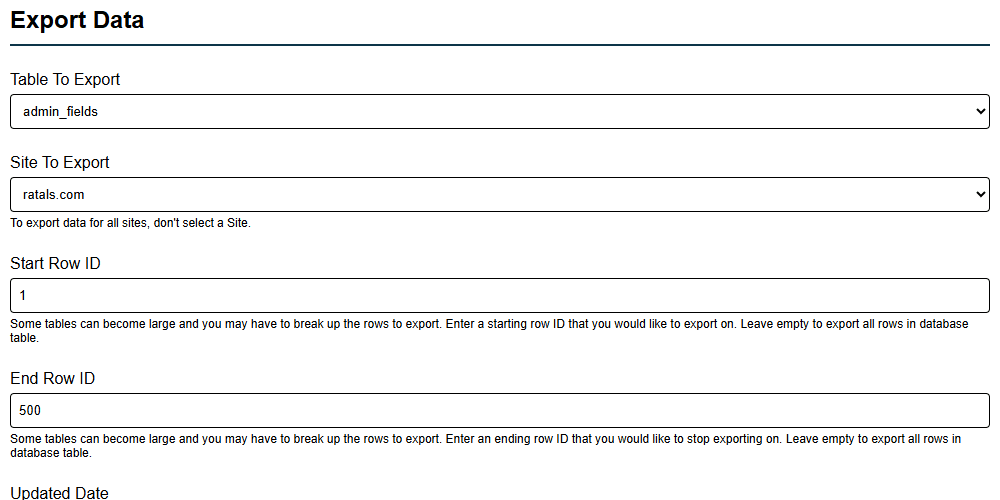
For large tables with millions of rows, you can choose to export only a specific range — for example rows 1 through 500 — so you are only working with the data you actually need to edit rather than pulling the entire dataset every time.

Admin Export Database Data

For any business managing large volumes of content, products, or records, this can save significant hours on updates that would otherwise need to be made one record at a time.

Multi-Site Management

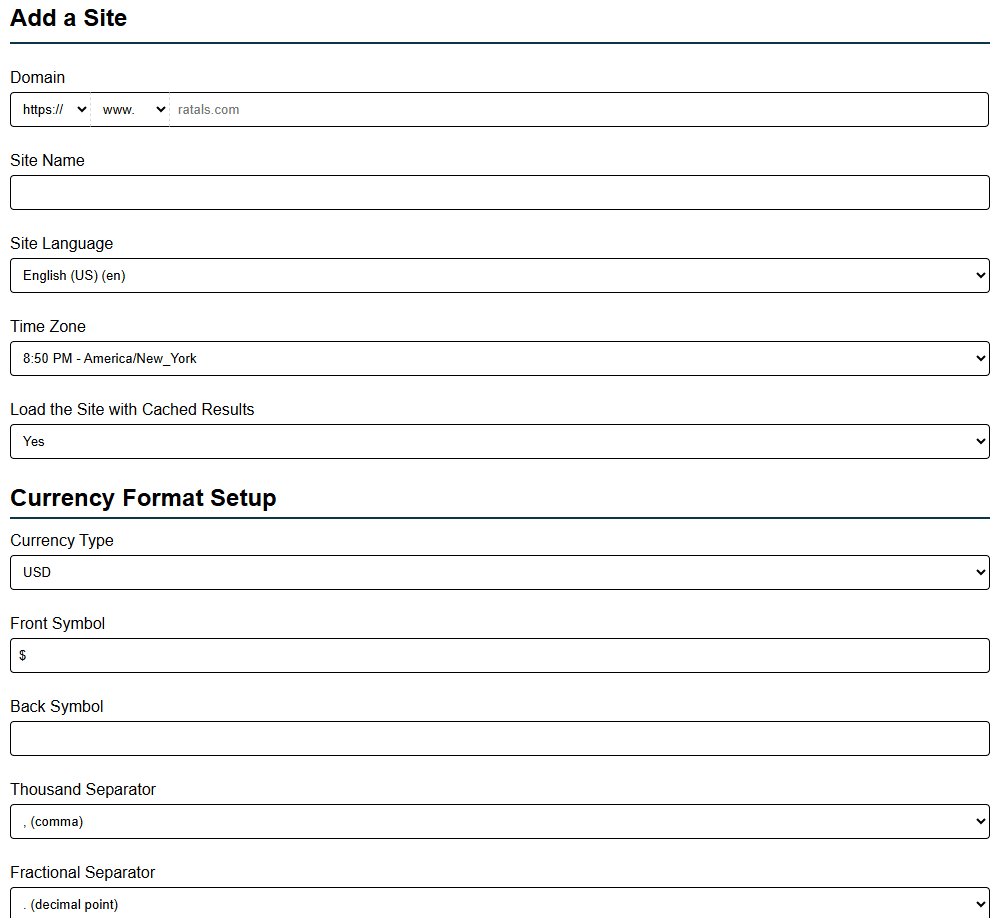
Ratals is built to run multiple websites from a single installation. Adding a new site is as simple as clicking add site in the admin, entering your site details, and Ratals builds everything out automatically — the frontend template, site settings, and all configuration needed for the site to load correctly from day one.

Each site gets its own full configuration including:

  • Currency settings for global or regional sites
  • Cache settings to control how the site loads for performance
  • HTTPS, www or non-www domain preference with automatic 301 redirect handling
  • Address, phone, and location details for region-specific sites
  • Hreflang settings for international SEO
  • SMTP email configuration for account creation, order confirmations, and transactional emails

Add Site Configuration

Every email sent through Ratals uses SMTP, giving you the highest level of delivery reliability through proper domain verification including SPF, DKIM, and DMARC. This same email system handles order confirmations for users on the Ratals Commerce package, ensuring transactional emails reach customers consistently.

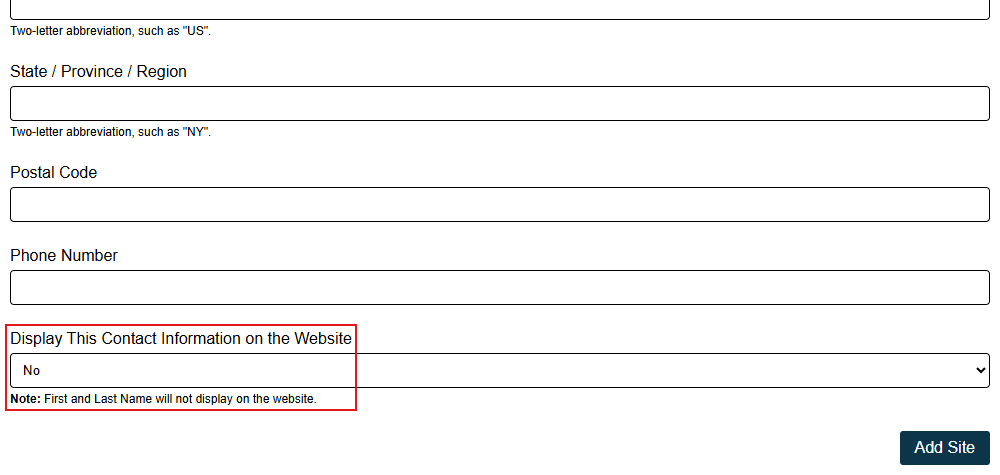
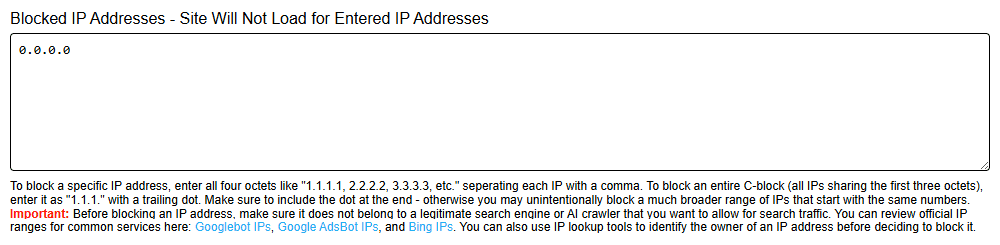
When setting up a new site you can also choose whether to display contact details publicly. If disabled, Ratals removes them from the footer, the contact page, and from schema data — so that information cannot be picked up by search engines. Every setting is scoped to the individual site, giving you precise control across every domain you run from the platform.

Company Contact Details Visibility Setting

Built-In Caching System

Ratals includes a fully built-in caching system with no third-party tools or external services required. Caching is handled through a file-based approach rather than memory, and that decision was intentional. Storage is inexpensive and reliable — memory has limits, and a cached page should never drop because a memory threshold was reached. File-based caching means your highest traffic pages stay served consistently regardless of load.

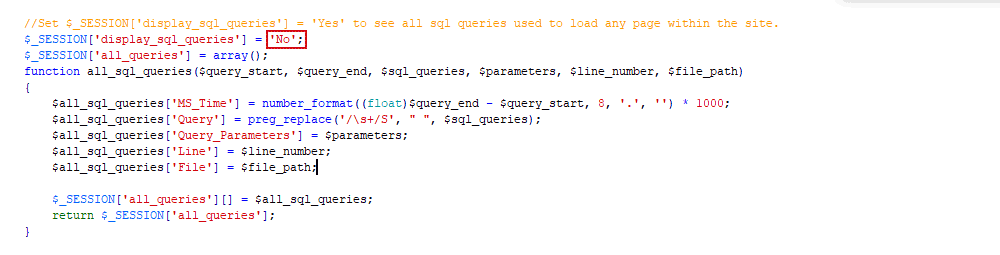
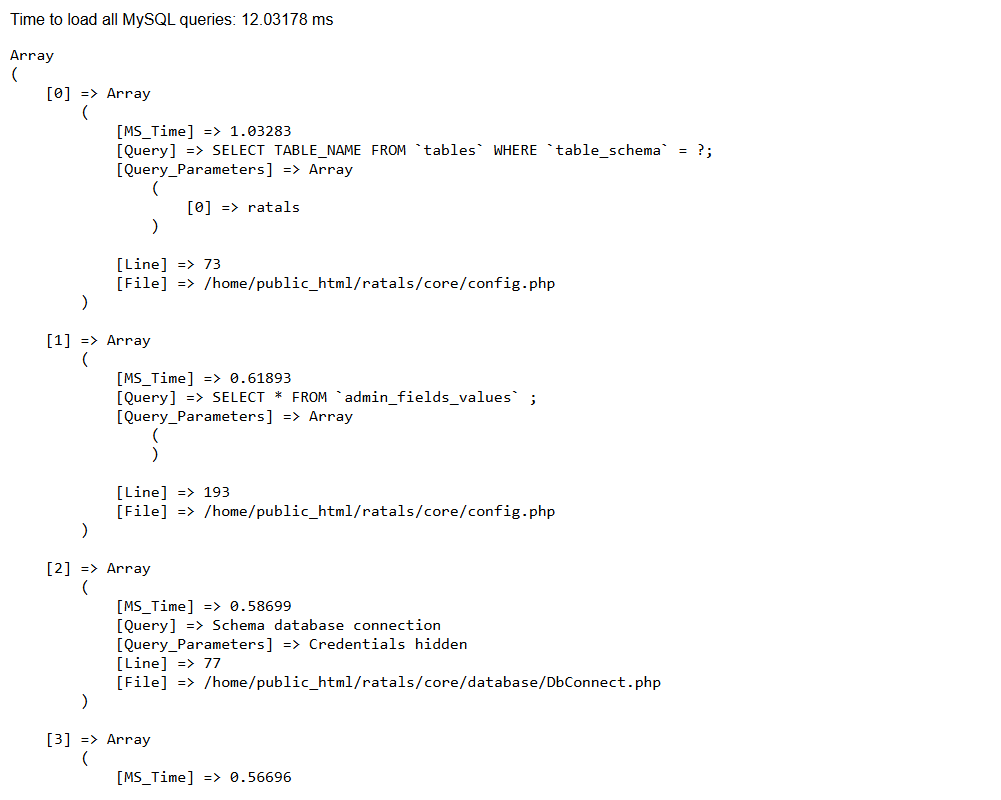
At Ratals we believe caching should complement a fast backend, not compensate for a slow one. Even without caching enabled, Ratals almost always delivers a fully rendered page in under 200ms after the SSL connection is established — as demonstrated with real benchmark data here. With caching active, sites with high traffic volumes can cut database queries by up to 75%, significantly reducing server resource usage at scale.

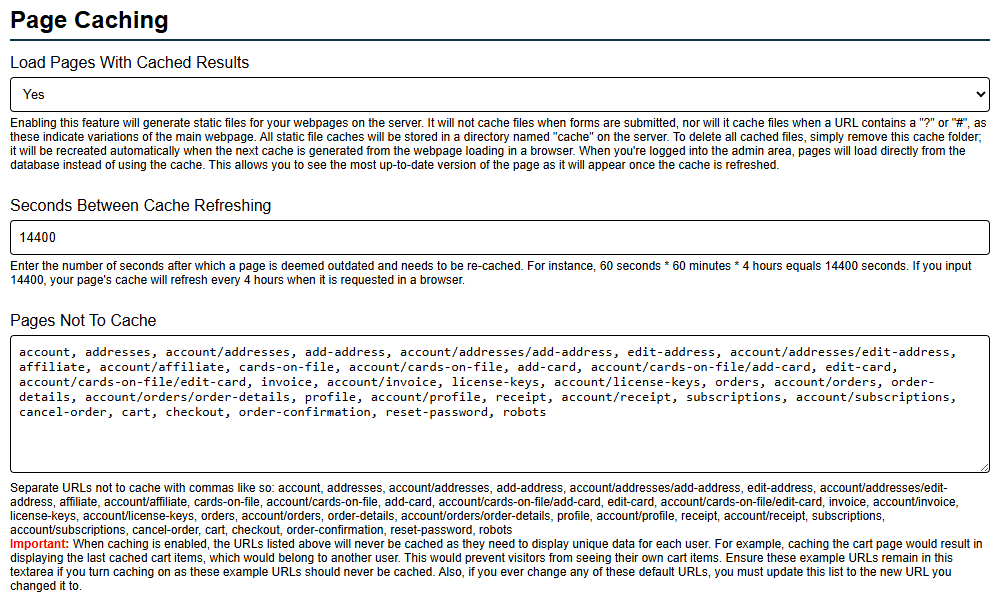
The caching system gives you precise control over what gets cached and what does not. At the template level, individual sections can be excluded from caching entirely. The header, for example, is never cached by default because it carries personalised data — a logged in user seeing their name, their cart count, or account-specific information. Any section of a template that serves personalised content can be marked as a non-cached fragment while the rest of the page loads from cache at full speed.

At the URL level, you can set specific pages to never cache. By default Ratals excludes the following URLs from caching out of the box — with both flat and hierarchical versions covered so the setting holds regardless of which URL structure your site uses:

account, account/addresses, account/addresses/add-address, account/addresses/edit-address, account/affiliate, account/cards-on-file, account/cards-on-file/add-card, account/cards-on-file/edit-card, account/invoice, account/license-keys, account/orders, account/orders/order-details, account/profile, account/receipt, account/subscriptions, cancel-order, cart, checkout, order-confirmation, reset-password, robots

These are pages that either display personalised information or require the latest data on every load, such as the sitemap and robots file. Any additional URLs that need the same treatment can be added directly in the admin.

You also have full control over cache duration. The default is set to 14,400 seconds — four hours — but this can be adjusted to suit your site's content update frequency. Caching can also be turned on or off entirely from the admin at any time, making it straightforward to disable on a development site where you need to see changes immediately.

Website Caching Settings

When an admin user is logged into the backend, caching is automatically disabled on the frontend for that session. This means any changes made in the admin are visible immediately on the site without needing to clear or wait for the cache to expire — making the editing experience seamless regardless of whether caching is active for regular visitors.

Media Library & Asset Management

The Ratals Media Library handles everything from upload to delivery — automatically creating optimised image variants, managing file organisation, and giving you granular control over how every media file loads on the frontend. All of it from inside the admin with no external tools required.

Media Library Dashboard

Uploading Media

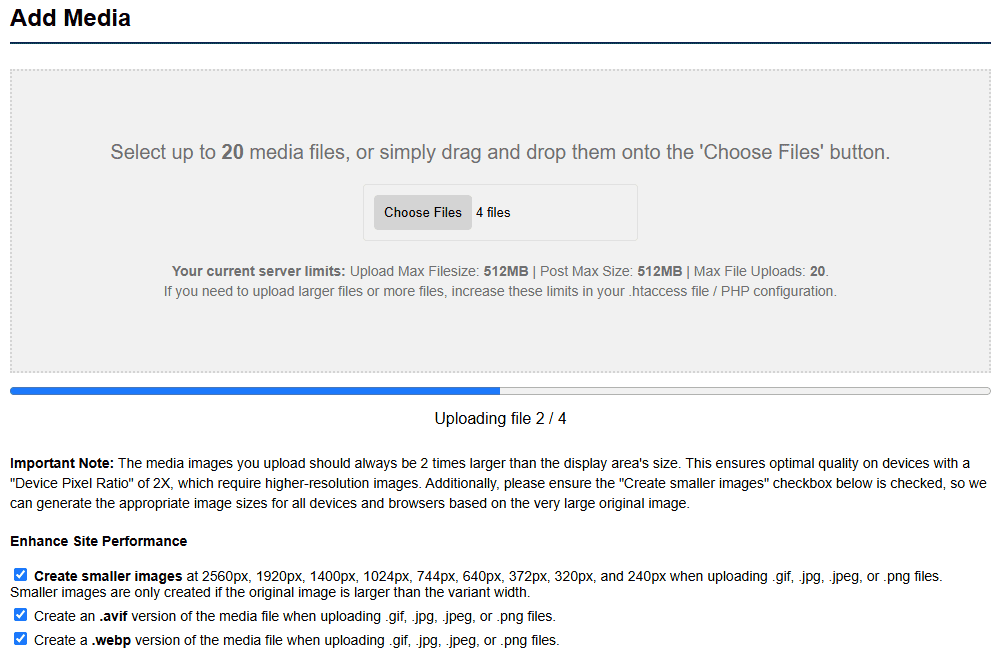
Adding media is as simple as selecting or dragging and dropping files onto the upload area. When uploading .gif, .jpg, .jpeg, or .png files, Ratals can automatically generate variant sizes for tablet and mobile at the same time. If you want WebP and AVIF compressed versions created alongside the originals, simply leave that option checked before uploading — Ratals handles the conversion automatically.

A progress bar tracks each file individually as it uploads, so you always know exactly where things stand when uploading multiple files at once.

Files and videos can also be uploaded through the same interface. For third-party video embeds such as YouTube, the Add Video Embed section lets you paste the embed URL and Ratals builds the full embed automatically — creating a short code you can use anywhere on the site with no coding required.

Media Upload Interface With Progress Bar

Automatic Naming & Tagging

When media is uploaded, alt and title tags are generated automatically. Ratals takes the file name and converts any dashes or underscores into spaces, turning a file name like my-product-hero-image.jpg into a clean, readable tag automatically. This makes media easier to find when searching and ensures every file has meaningful tags in place from the moment it is uploaded — without any manual effort.

Browsing & Filtering the Library

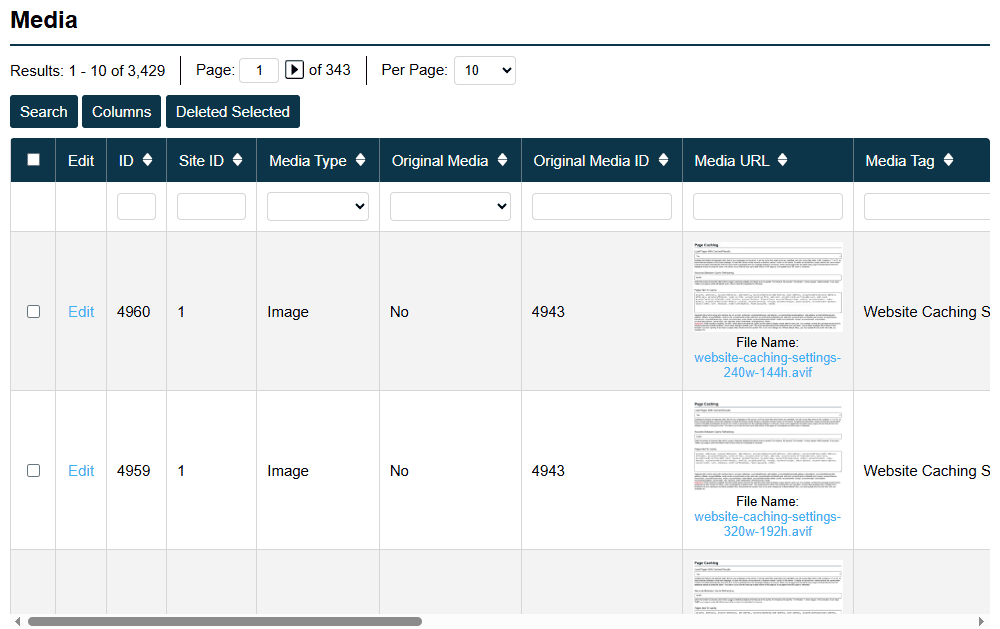
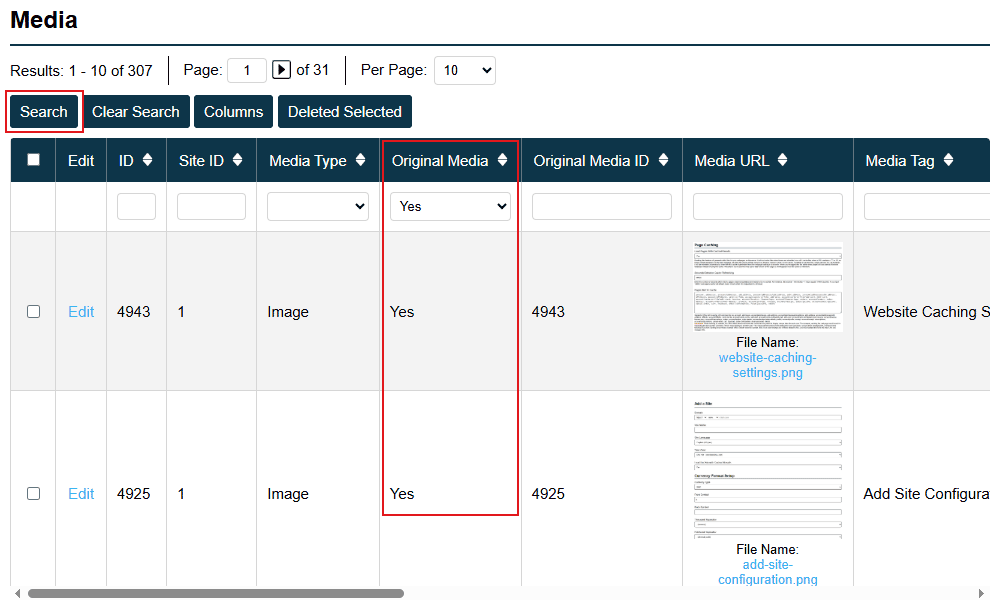
The media library displays all uploaded files including original uploads, variant sizes, WebP versions, and AVIF versions. To keep the view manageable, the Original Media column lets you filter to show only your original uploads — hiding all the generated variants so you are working with one entry per file rather than the full set of derivatives.

If you want to see every version generated from a specific file, enter its original media ID and the library shows all variants created from that source. A keyword search is also available, searching across file names and alt or title text to help you find exactly what you need fast.

Media Library Filter And Search Controls

Embedding Media

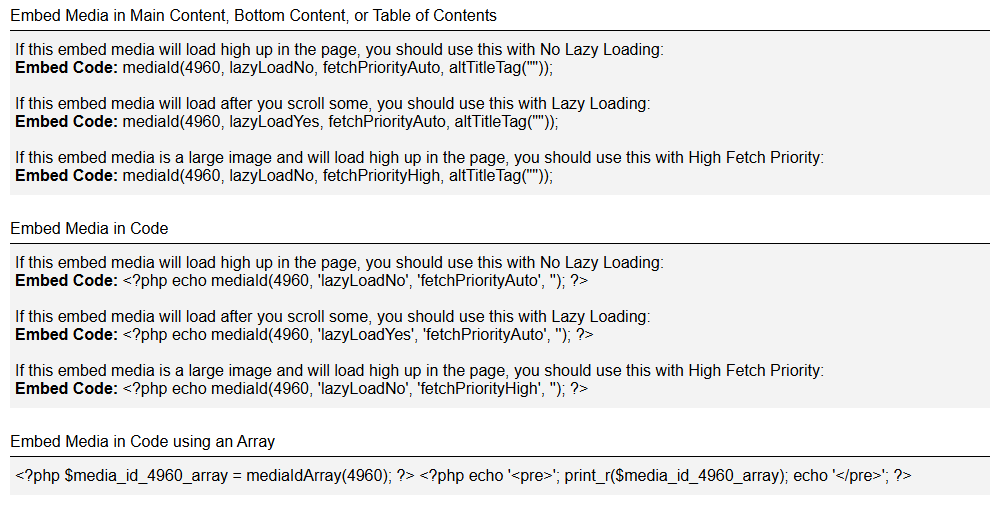
Every media file includes ready-to-use embed codes you can copy directly from the media edit page. Ratals provides three embed options depending on where the media will appear and how it should load:

Embed in Content, Bottom Content, or Table of Contents

For media loading high on the page with no lazy loading:

mediaId (1, lazyLoadNo, fetchPriorityAuto, altTitleTag(""));

For media loading after scrolling with lazy loading:

mediaId (1, lazyLoadYes, fetchPriorityAuto, altTitleTag(""));

For a large hero image loading high on the page with high fetch priority:

mediaId (1, lazyLoadNo, fetchPriorityHigh, altTitleTag(""));

Embed in Template Code

For media loading high on the page with no lazy loading:

php echo mediaId (1, 'lazyLoadNo', 'fetchPriorityAuto', '');

For media loading after scrolling with lazy loading:

php echo mediaId (1, 'lazyLoadYes', 'fetchPriorityAuto', '');

For a large hero image loading high on the page with high fetch priority:

php echo mediaId (1, 'lazyLoadNo', 'fetchPriorityHigh', '');

Embed as a PHP Array in Template Code

If you need direct access to all media data for custom template use:

php $media_id_4906_array = mediaIdArray (4906);
php echo 'pre'; print_r($media_id_4906_array); echo 'pre';

Every embed automatically outputs a picture tag containing all generated size and format variants, allowing the browser to select the most appropriate version for the device and connection — without you having to write a single line of markup.

Media Edit Page Embed Codes

Important: Always use the media ID of the original uploaded file when embedding. Ratals uses the original media ID to locate and load all generated variants — the different sizes, WebP, and AVIF versions — and assembles them into the full picture tag output. If you use a variant image ID instead of the original, the system cannot find the full variant set and the image will not load correctly.

If you do not set a custom alt or title tag in the embed code, Ratals automatically uses the tags generated from the file name at upload. This means every embedded image always has meaningful alt and title attributes in place without any extra effort — keeping your media well tagged for both accessibility and search engines by default.

Selecting Media for Pages

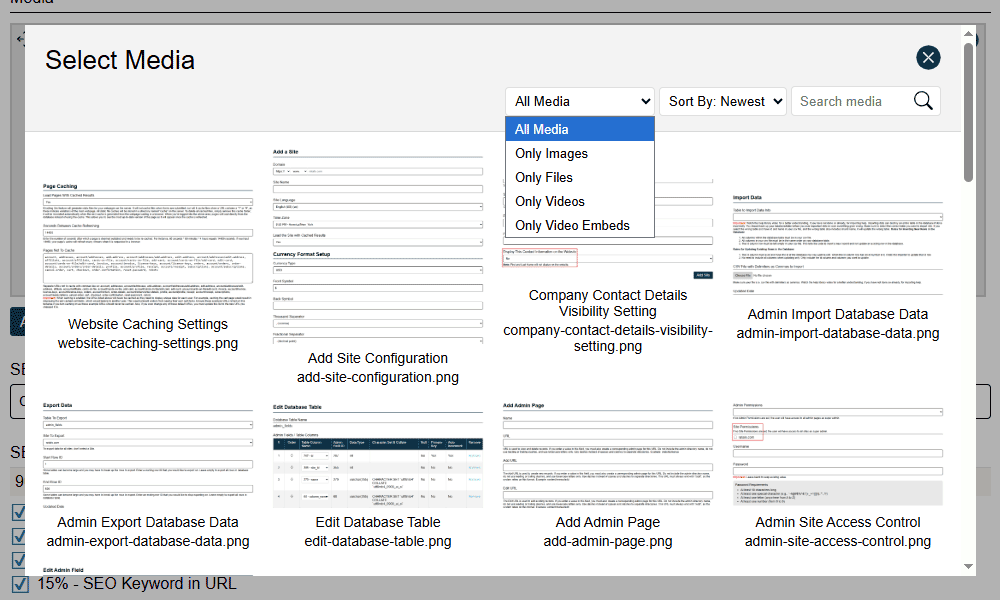
When editing any page, category, post, or product, a dedicated Add Media button opens the media selector directly — with keyword search, media type filtering, and sorting by newest to oldest so you can find the right file quickly and set it as the main media for that URL.

Edit Page Media Selector

Granular Loading Controls

Every media embed in Ratals gives you individual control over lazy loading and fetch priority at the point of use. Hero images above the fold can be set to load immediately with high fetch priority. Images further down the page can be lazy loaded so the browser only downloads them when needed. This level of control at the individual embed level is one of the reasons Ratals is able to deliver the performance scores it does — nothing is left to default browser behaviour when it matters.

AVIF & WebP Generation

AVIF and WebP variants are created automatically on upload when the option is checked. AVIF generation requires the AVIF package to be compiled into PHP via the GD library. If it is not available on the server, Ratals detects this automatically on upload and skips AVIF creation without throwing an error — WebP and standard variants are still generated as normal. As soon as AVIF support is available on the server, it will be included in future uploads.

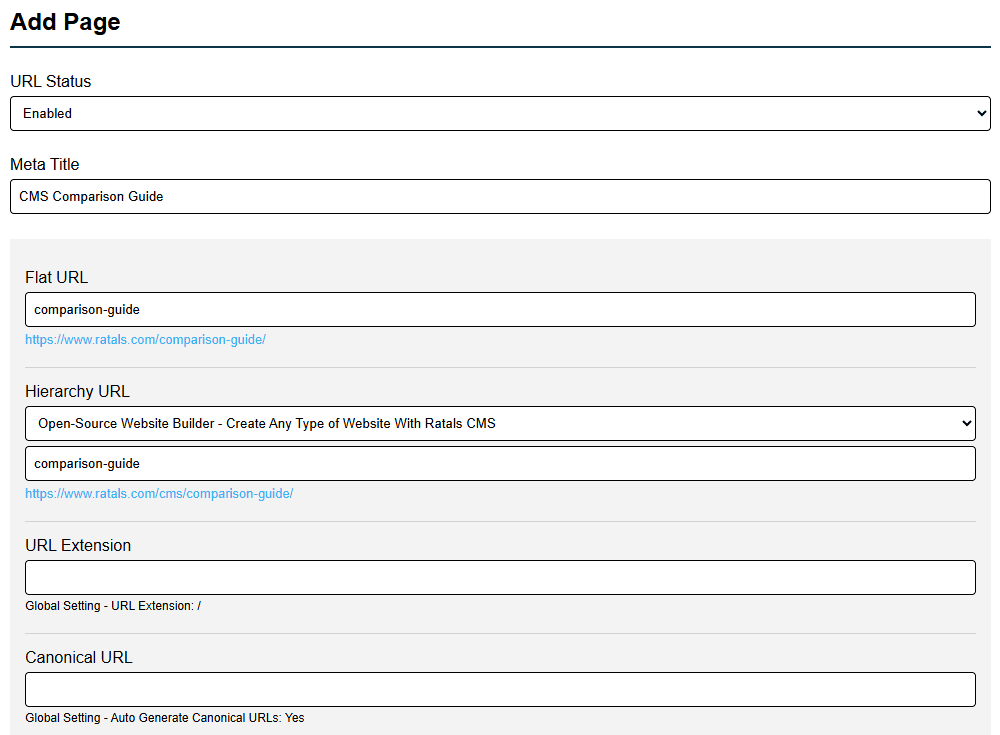
Create Any URL Structure

Your URL structure should reflect your business, not the other way around. Ratals gives you complete control over how every page, category, post, or product is structured across your site.

URLs are built dynamically from existing URLs, so you can compose exactly the structure you need. A product page can stand on its own, or have posts, guides, and sub-pages sitting naturally beneath it:

/cms/post-page-as-a-comparison-guide

or

/cms/category-page-as-a-comparison-guide

Starting with a base like "cms", you can keep adding segments through the drill-down system until the URL matches exactly what you're building. No workarounds, no limitations.

Admin Url Builder Interface

You can also choose between flat or hierarchical URLs at the site level. Enable automatic 301 redirects and Ratals handles the rest — pointing every variation to your preferred canonical structure so search engines always index the right page, and your SEO stays clean as the site grows.

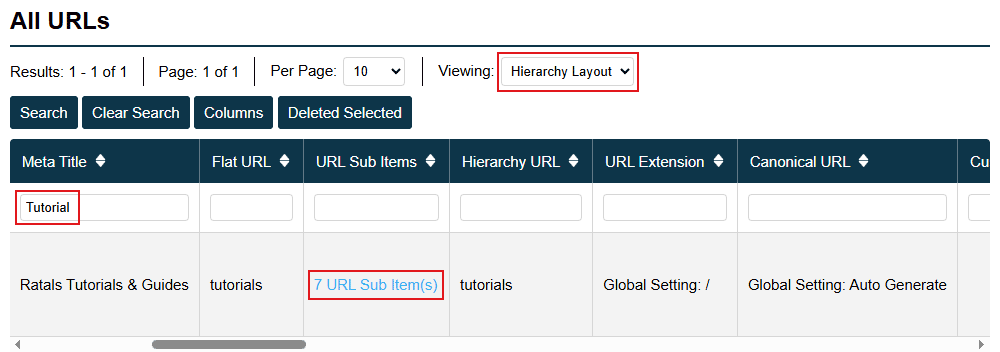
Managing your URL structure is just as straightforward. From the URLs section in the admin you can see every URL organised by hierarchy level, along with how many supporting pages sit beneath it.

Urls And Sub Items Count

This makes it easy to spot which key pages have strong supporting content behind them and which ones need attention — so you always know where to focus your marketing efforts.

Build Any Experience On Any URL

Once your URL structure is in place, Ratals gives you the freedom to build whatever experience belongs on it.

Content types like pages, posts, categories, products, and author profiles each come with the core system behavior they need to function. A product page includes attributes, variants, and options. A category page handles product and inventory filtering for sizes, colors, and more so visitors can find items fast. A blog post page handles comments and replies. That foundation is always there.

What sits on top of it is entirely up to you.

That same product page can carry in-depth documentation, a comparison table, a full marketing section, or an SEO content hub — all on the same URL, managed from the same place. There are no artificial boundaries between what a page type is and what it can display.

This is made possible through two layers of control built into every URL in Ratals — Sub Items and Templates. Together they give you the ability to build virtually any layout or experience without touching the core system behavior underneath.

Sub-Item Content Builder

Sub-Items are how you build and manage the sections of any page, directly inside the admin — no developer required.

While templates handle the overall structure of a page, Sub-Items let you inject dynamic, fully customizable sections within it. Every template that comes with Ratals has the Sub-Item include built in, so Sub-Items are available on every URL by default — not just on custom or blank canvas templates. You have three ways to build with them:

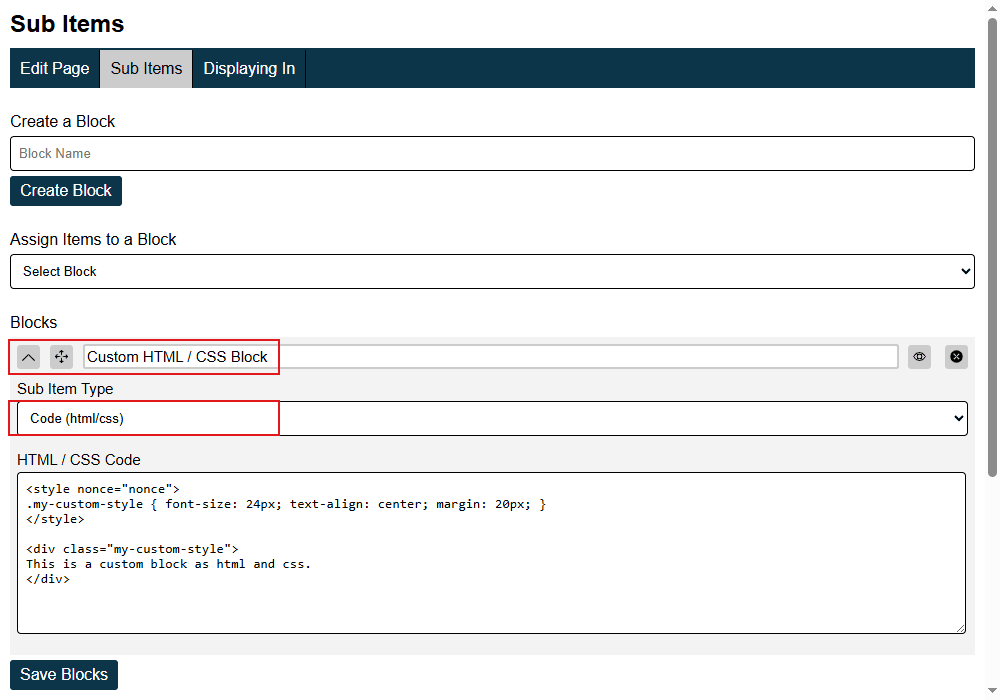
Code (HTML/CSS)

Write custom HTML and CSS directly inside a Sub-Item block. Full control over layout, styling, and structure. Perfect for bespoke marketing sections, unique UI components, or anything that needs to be built exactly to spec.

Ratals runs a Level 4 Content Security Policy nonce for security. Any style or script tags used inside a code block must include nonce ="nonce" as an attribute:

style nonce ="nonce"
script nonce ="nonce"

Ratals automatically replaces nonce ="nonce" with the real nonce value when the page is delivered to the browser. Without this attribute, inline styles and scripts will be blocked by the browser and will not render.

Sub Items Custom Html Css

Include File

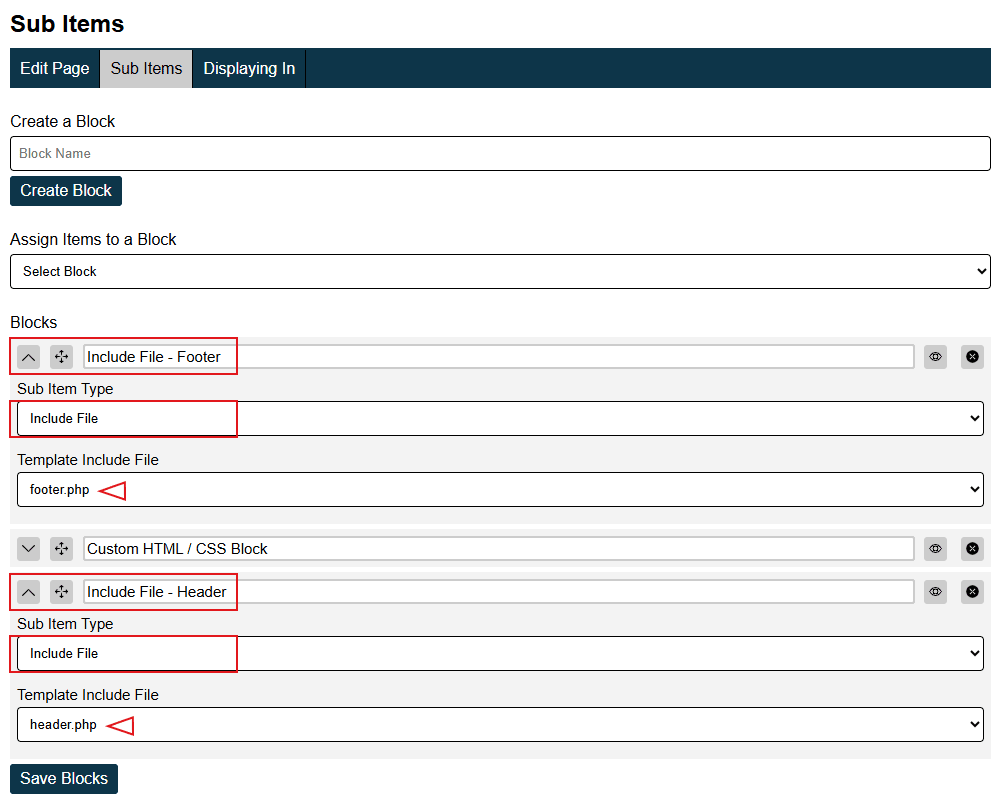
Pull in reusable components already built inside the template system — headers, footers, feature blocks, sidebars — and drop them into any page. Build it once, use it everywhere, update it in one place.

Sub Items Include File

Sub Items

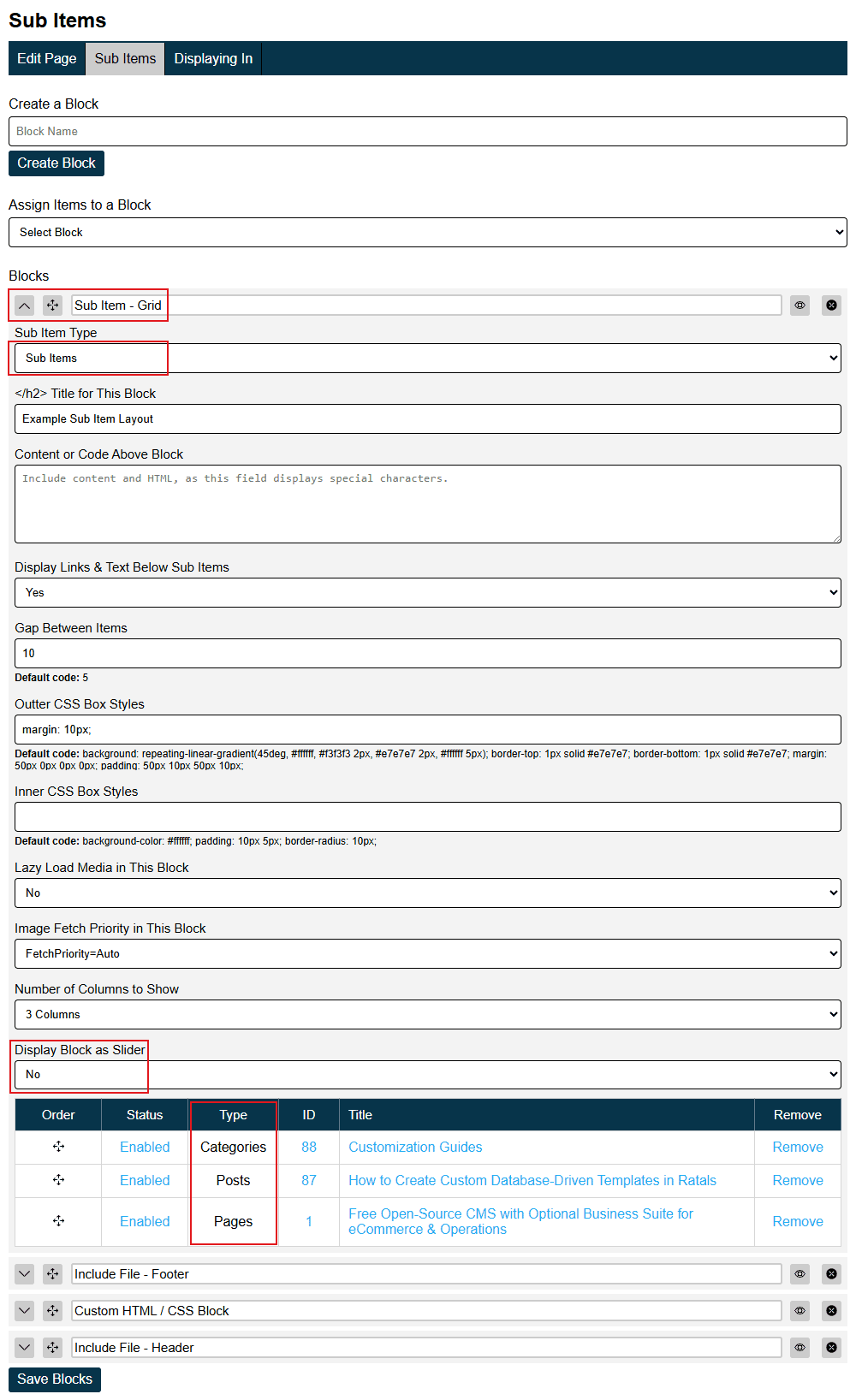
Assemble structured content layouts using any mix of content types: products, posts, categories, pages, or authors. Display them as a grid or instantly switch to a carousel — the same content, two different experiences, no rebuild needed.

Sub Items As Sub Item Grid

Every Sub-Item block can be dragged into any order, or disabled individually without removing it. Want to build an entire page from Sub-Item blocks alone? That's fully supported — giving you a completely modular page with every section under your direct control, all from the admin interface without touching a line of code.

Controlling Where Sub-Items Load in a Template

Each template includes a sub_items.php include file that controls exactly where Sub-Items render within the page layout. If you want Sub-Items to appear in a different position — for example, moving them above the main content on a post template — simply duplicate the template, move the sub_items.php include to the position you want, and assign that template to the URL. Sub-Items will then load exactly where you placed them, giving you precise layout control without rebuilding the template from scratch.

Blank Canvas Template

Every Ratals install includes a blank canvas template automatically. Assign it to any URL and you start with a completely empty page — no predefined layout, no structure to work around.

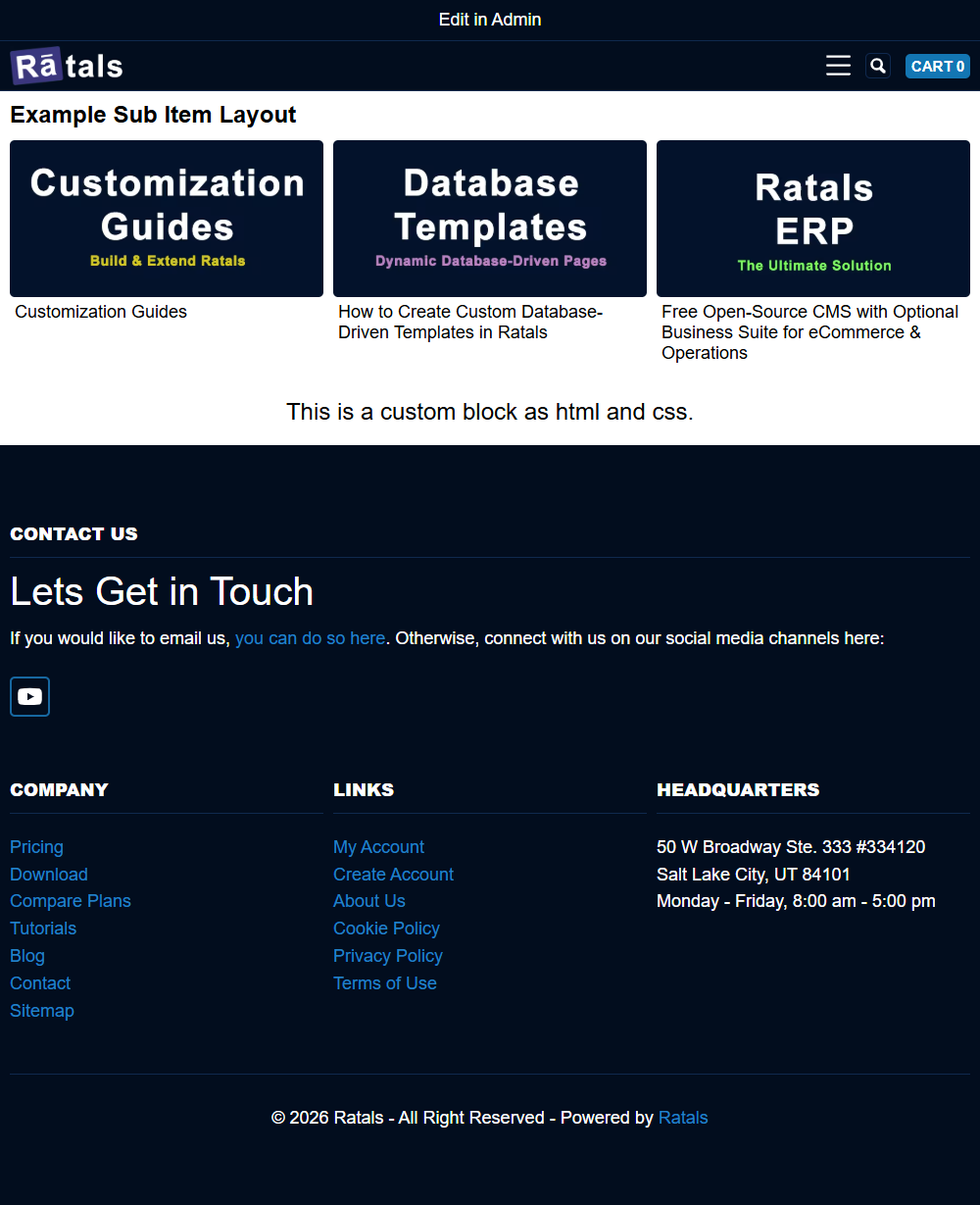
To show how this works in practice, the screenshots below use a real example page at /example-page/ with the blank canvas template assigned to it. The first screenshot shows the Sub-Item blocks in a deliberately scrambled order — the sub-item grid first, then the footer, then the custom HTML block, then the header at the bottom — to illustrate the drag and drop reordering capability.

Blank Canvas Template Build With Sub Items Mixed

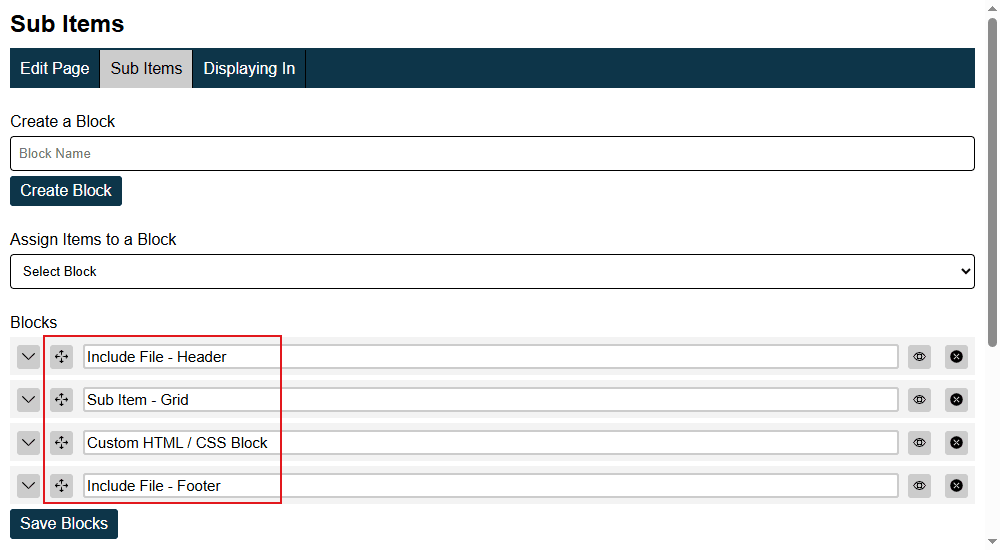
After reordering the blocks into the correct sequence — header, sub-item grid, custom HTML, footer — the page immediately takes the shape of a properly structured webpage.

Sub Items Ordering Blocks

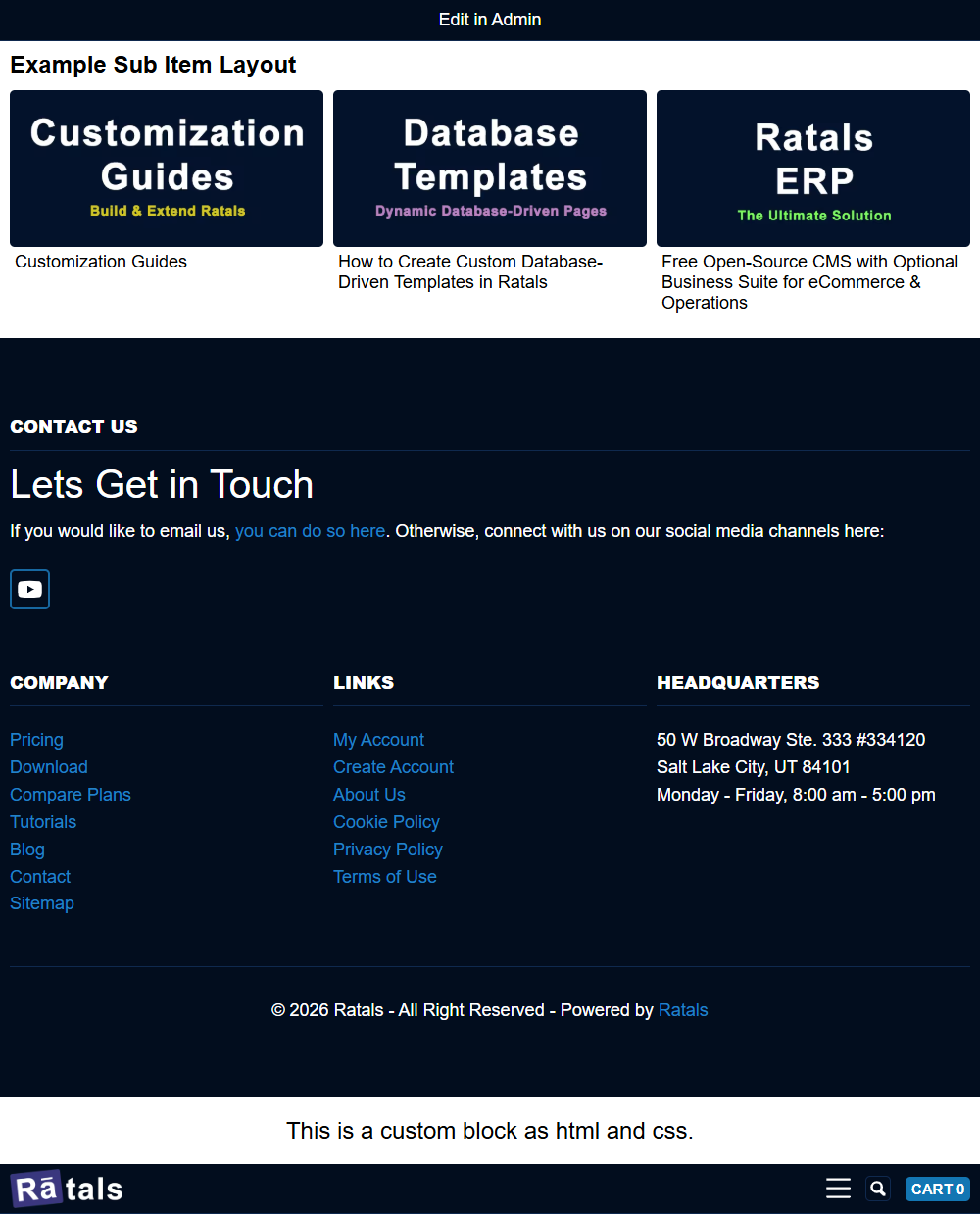
Here is how the new order renders on the frontend — the page loads exactly as the blocks are arranged, header at the top, then sub-item grid, custom HTML block, with footer at the bottom.

Blank Canvas Template Build With Sub Items

Any member of your team — marketing, sales, content, or executive — can build and reorganise pages this way directly from the admin. No server-side coding needed. For custom HTML and CSS blocks, use your preferred AI assistant to design the section you want, paste it in, and it is live.

Blank canvas templates make Sub-Items even more powerful. You only need to build a full template when you want to start from one. For everything else, the blank canvas gives you a clean starting point and Sub-Items do the rest.

Flexible Template System

Every URL in Ratals has a template assigned to it, and you have full control over how that template is built. Whether you want a fully static page or a dynamic data-driven experience, the template system is designed to make both straightforward.

Static Templates

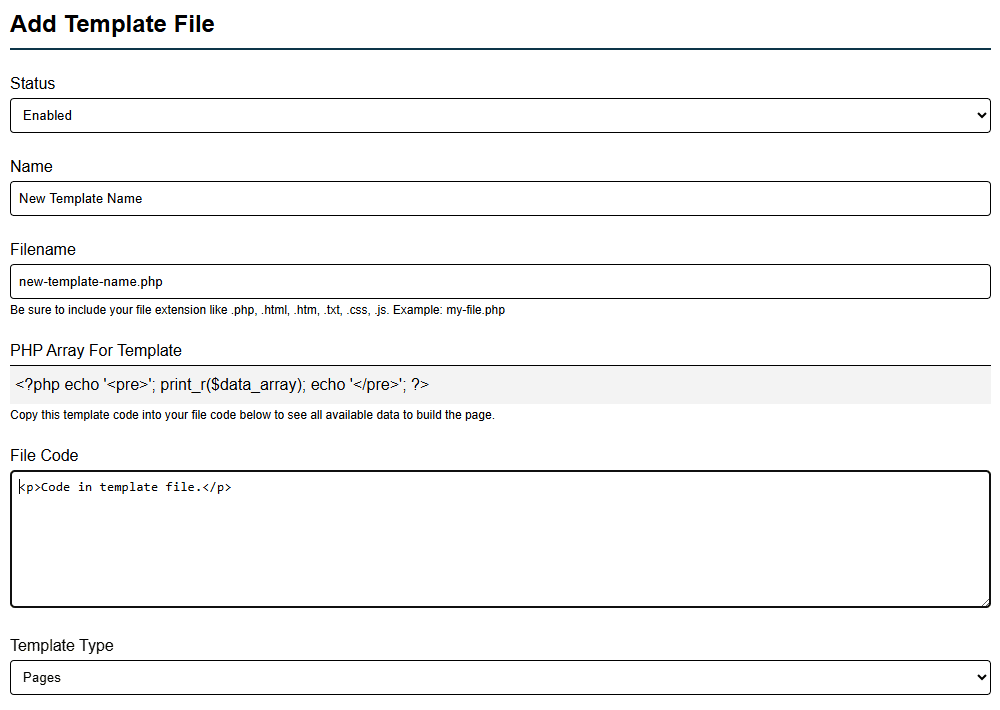
For pages that do not need database-driven content, you can create a static file directly from the admin area, add your HTML and code, and assign it to any URL. The page loads entirely from that file — fast, simple, and fully under your control.

Add Template File Static Code

Dynamic Data-Driven Templates

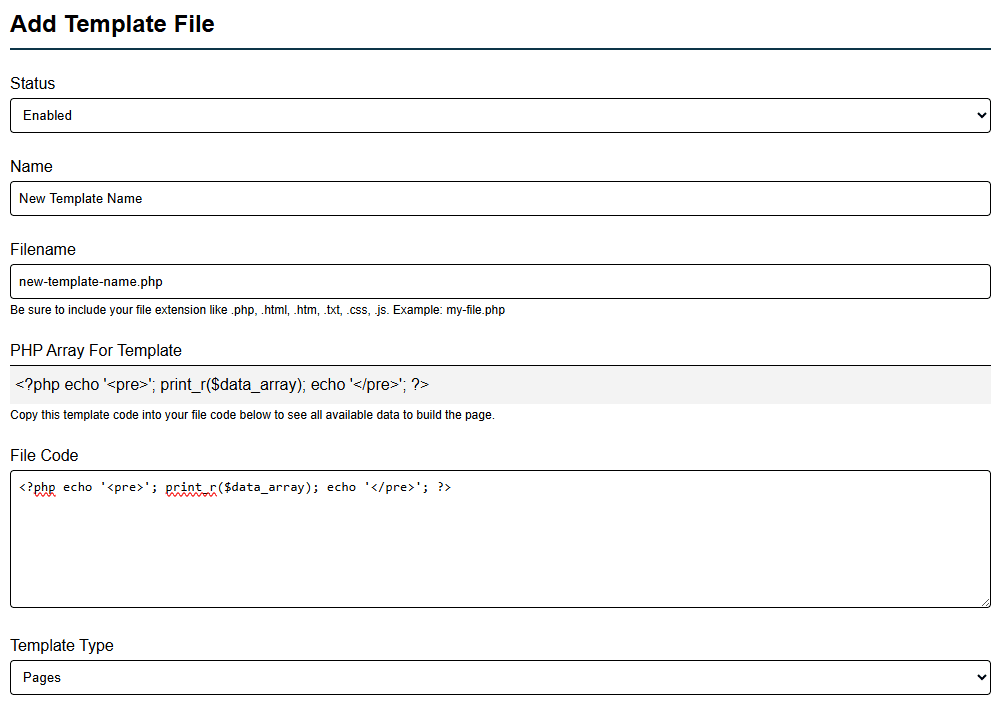
For database-driven pages, every URL in Ratals automatically pushes its data into a single PHP array called $data_array. To see exactly what data is available for any URL, you can print it out directly:

php echo 'pre'; print_r($data_array); echo 'pre';

Add Template File Dynamic Code

This prints everything powering that URL — product data, category data, post content, author details, custom fields, and more — all in one place. From there, creating a new template is as simple as making a new PHP file, copying in the array output, and calling the values you need. Assign that template to any URL and you are done.

Because all data is available in a single array, you are never hunting through dozens of files trying to figure out where a value comes from or how to add a new one. Everything is visible and accessible from one place.

Custom Fields & Custom Tables

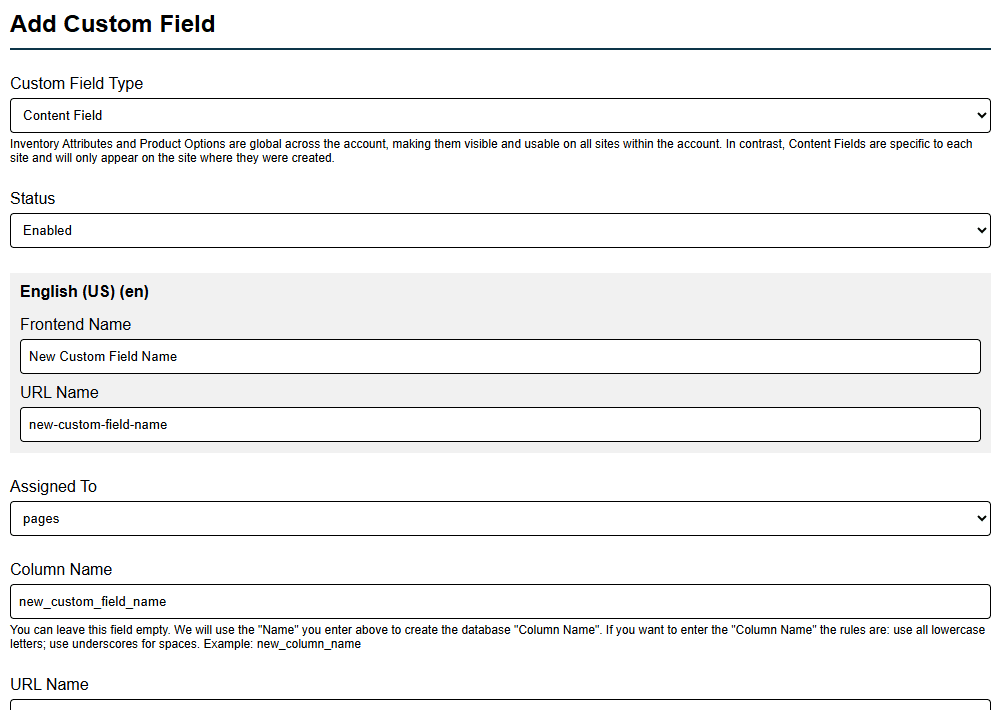
If you need a value that is not already in the array, you can create a custom field in the admin and assign it to any database table — the URLs table, categories table, products table, or any other. That field gets pulled into the array automatically, ready to be called in your template. Every URL can then save its own unique value for that field and display it on the frontend.

Add Custom Content Field

If your template needs data from custom tables you have built in the admin, you can query those tables directly and build them into a PHP array — giving you the ability to create any experience from any data your platform holds.

Duplicate & Modify

Any template can be duplicated and modified. If you want Sub-Items to appear in a different position within a layout, duplicate the template, move the php include for sub_items.php, and assign the new version to whichever URLs need it. Variations of any experience can be created quickly with minimal development work.

Built for Speed, Not Just Developers

You do not need years of coding experience to work with Ratals templates. The $data_array approach is intentionally straightforward — hand the array and your template file to any AI assistant and it can show you exactly how to call any value and build out any layout you need. This removes the waiting and cost of traditional development cycles. Customise the template, assign it to the URL, and you are done.

For full documentation on creating templates with custom database queries visit the Ratals template customisation guide.

Built-In SEO Tools

SEO in Ratals is not an add-on or a plugin — it is built directly into every URL in the system. When you create or edit any URL, whether it is a page, post, product, category, or author profile, the full set of SEO controls is already there waiting for you.

Every URL has direct control over:

  • Meta titles and meta descriptions
  • Meta keywords
  • Canonical URLs — set manually or auto-generated
  • Meta robots directives
  • Hreflang relationships for international SEO
  • H1 content
  • Breadcrumb configuration
  • XML and HTML sitemap inclusion
  • Search visibility settings
  • Author attribution
  • Published and last updated dates

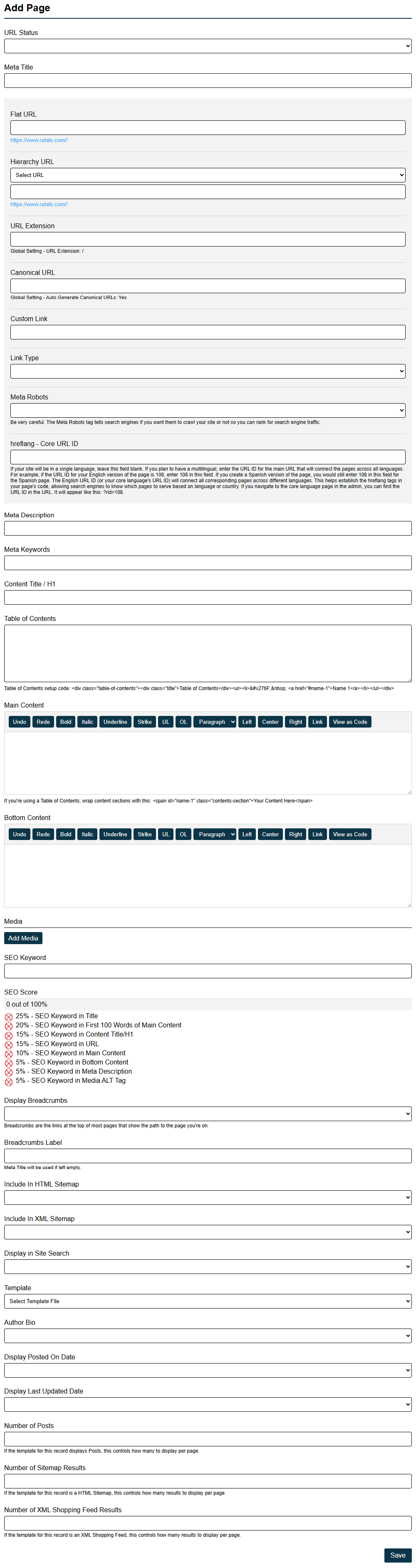
Seo Settings For Add Page

SEO Starts With URL Control

Because Ratals gives you complete control over how every URL is structured and organised, your site architecture can be built around how your business and your content actually work — not forced into predefined patterns. That flexibility leads to cleaner site structures that are easier for both visitors and search engines to understand, navigate, and index.

Canonical URL Management

A product may appear across multiple categories. Content may live in more than one section of your site. Ratals includes canonical URL controls on every URL record, letting you explicitly define which version of a page should be treated as the primary source. This keeps indexing signals clean and ensures search engines always know which page should rank.

Meta Robots Control

Not every page should be indexed, and not every page should pass link equity. Ratals gives you direct meta robots control on every URL — whether you are managing staging content, temporary landing pages, filtered category views, or any other page that needs specific indexing behaviour. No custom code required, no plugin needed.

Hreflang & International SEO

For businesses running multiple regional or language sites, hreflang relationships are managed directly within the CMS at the URL level. If you are running multiple sites from a single Ratals installation — as covered in the Multi-Site Management section — hreflang connections between those sites can be maintained cleanly without manually managing markup across template files.

XML & HTML Sitemap Controls

Every URL decides independently whether it should appear in your XML sitemap, your HTML sitemap, or both. This gives you precise control over what gets submitted for indexing — particularly useful when managing content hubs, campaign pages, documentation sections, or any part of your site that needs to be handled differently from the rest.

Author & Content Freshness Signals

Every URL can be associated with an author profile, a publication date, and a last updated date. These signals can be applied to any URL type — a tutorial, a product page, a documentation article — wherever authorship and content freshness add credibility and help search engines better understand the expertise behind the content.

SEO Built Into the Architecture

The URL structure supports SEO. The template system supports it. Sub-Items support it. Sitemap controls, canonical management, metadata, hreflang, robots directives — all of it is part of the platform from the ground up. Because SEO was considered during the design of Ratals rather than added on top of it, everything works together naturally. No SEO plugin required, no third-party service needed, no settings spread across disconnected tools. Just one system where every URL is fully optimised from the moment it is created.

Internal Linking Intelligence

As a website grows, keeping track of how content connects together becomes increasingly important. Ratals gives you direct visibility into how every URL relates to the rest of your site — so you can build and maintain a strong internal linking structure intentionally, not by guesswork.

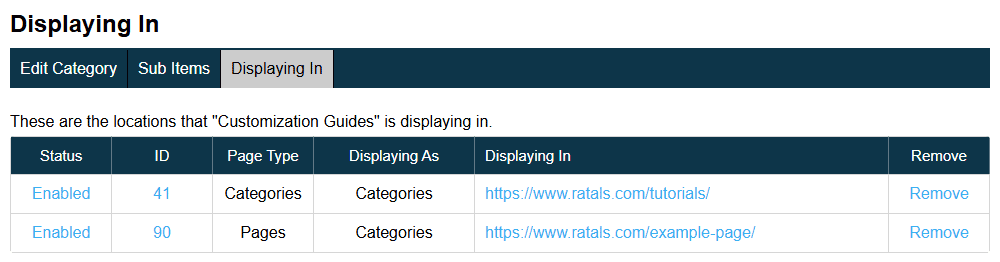
Displaying In

Every URL in Ratals includes a Displaying In section that shows exactly where that URL is currently being used across the site — every category page, content hub, documentation section, tutorial directory, custom Sub-Item grid, and any other structured relationship it appears in.

Before making changes to any URL, you can immediately see how many areas of the site depend on it. This removes the guesswork from content management as your site scales, and helps prevent accidental removal of content that other pages rely on.

Internal Linking Displaying In

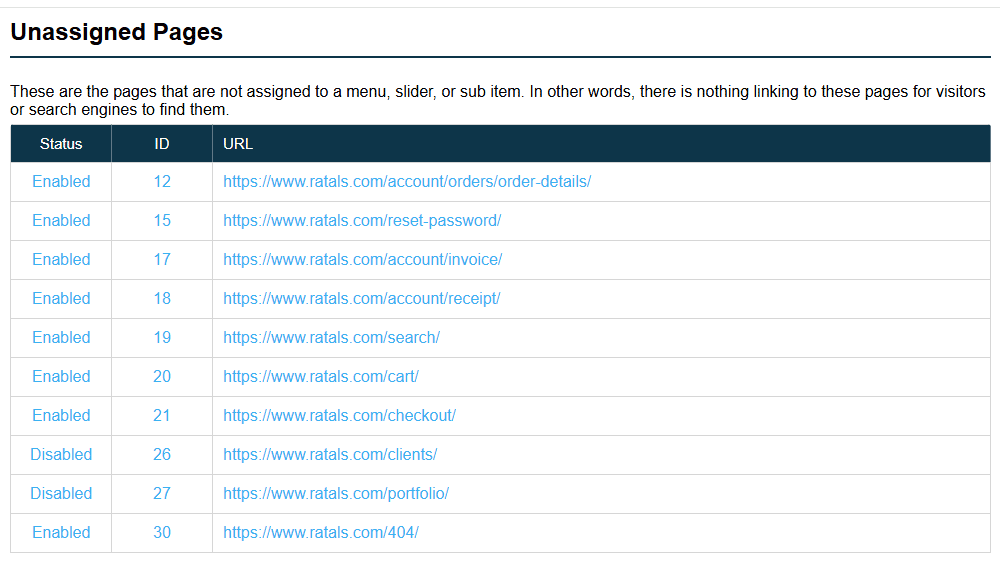
Unassigned URLs

The Unassigned section surfaces URLs that exist in the CMS but are not currently connected into the site's structure anywhere. These are pages with no Sub-Item grids, no category relationships, and no structured entry points pointing to them.

For growing sites this is a valuable tool. A tutorial gets written, a resource gets published, a landing page gets created — and if it never gets integrated into the broader structure, it sits disconnected regardless of how good the content is. Unassigned URLs makes those pages visible so you can act on them.

Internal Linking Unassigned Pages

Better SEO Through Better Structure

Search engines evaluate how pages connect together — which content is important, how topics relate, and where authority flows across a site. Strong internal linking supports all of that. Ratals gives you the visibility to manage those connections directly, leading to better crawlability, stronger topical authority, and a site structure that becomes easier to scale as you add more content over time.

Content Ecosystems Instead of Individual Pages

When you can see exactly how your content connects, you can build deliberately. Commercial pages link to tutorials. Tutorials link to documentation. Documentation links to resources. Resources link to comparisons. Everything supports everything else — creating a better experience for visitors and a stronger architecture for search engines. Ratals gives you the tools to build and maintain that structure from inside the admin, without external auditing tools or manual spreadsheet tracking.

Advanced Redirect Management

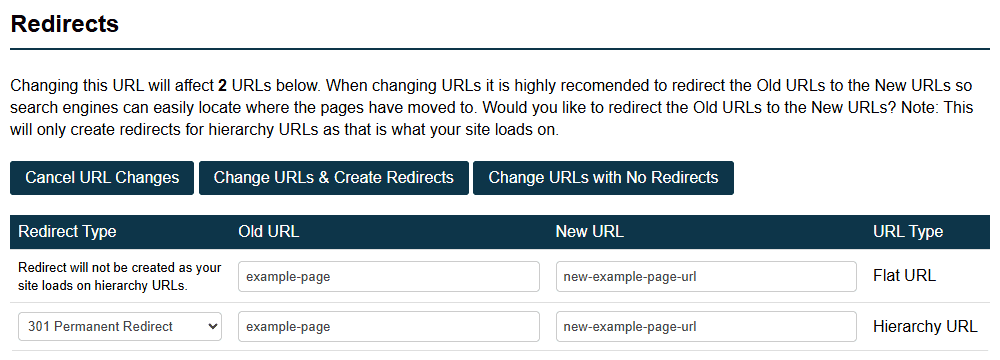
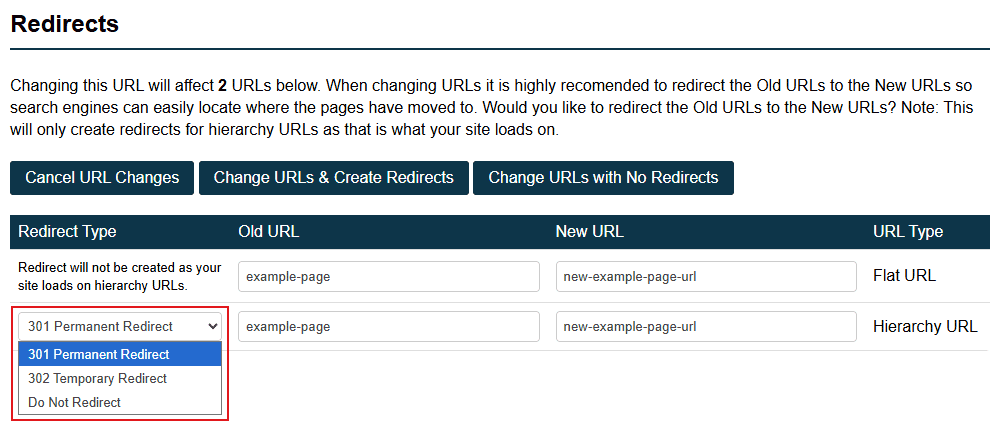
When a URL changes in Ratals, the system treats it as a structural event — not just a simple edit. Before any change is confirmed, Ratals shows you exactly what will be affected and gives you full control over what happens next.

See the Full Impact Before Making Changes

A single URL can be the parent of dozens, hundreds, or even thousands of child URLs beneath it. When you change a parent URL, every child URL changes with it. Ratals generates a full confirmation screen showing every URL that will be impacted before you commit to the change — whether that is five URLs or five thousand. Nothing changes until you have seen exactly what is about to happen and chosen to proceed.

Url Change List Confirmation Screen

Automatic Redirect Generation

Once a URL change is approved, Ratals automatically generates all the redirects needed to preserve traffic, rankings, and user experience. The system understands what changed and creates the appropriate redirect mappings without you having to build them manually one by one. For large content hubs, ecommerce catalogs, or documentation centers with thousands of URLs, what could otherwise take hours is handled in seconds.

Full Visibility Before Redirects Are Created

Before any redirects are created you can see exactly what the system is about to generate. At that point you have three options — approve the change and generate the redirects, approve the change without redirects, or cancel entirely. You are always in control of the outcome before anything is written.

Selective Redirect Control

Not every redirect from a URL change needs to be kept. Ratals lets you review every redirect that will be generated and remove individual entries before they are created. If certain URLs need custom destinations or should not be redirected at all, you can fine-tune the result before confirming — rather than being forced into an all-or-nothing decision.

Url Change Individual Redirect Selection

Automatic Redirect Chain Prevention

When a URL has multiple redirects chained together from previous changes, Ratals automatically loops through every redirect in the chain on the server side before anything is sent to the browser. This means the browser always receives the final destination URL in a single response — no matter how many redirect steps exist in the chain. The redirect history is preserved in full, but visitors and search engines are never exposed to the intermediate hops. The result is a clean, efficient redirect experience regardless of how many URL changes your site has gone through over time.

Protecting SEO Value

Every URL accumulates value over time — search rankings, backlinks, internal links, and user bookmarks. Ratals protects that value by making every URL change visible, understandable, and fully managed before it goes live. Rankings stay intact, backlink equity is preserved, and the traffic your content has earned continues flowing to the right place.

Short Codes — Keep Internal Links Always Up to Date

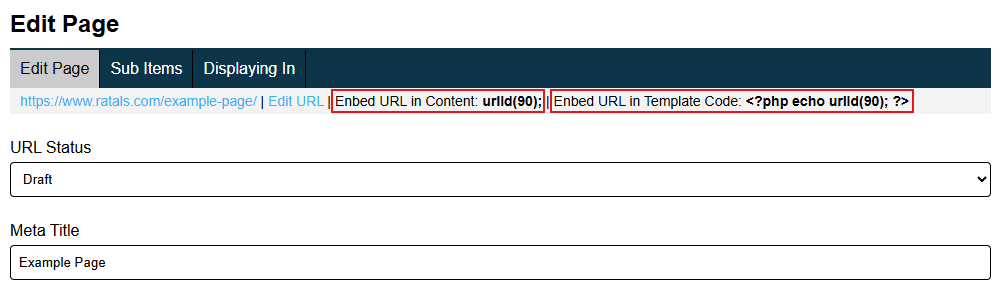
Ratals includes a short code system that lets you embed any URL by its ID rather than its path. When that URL changes, every internal link using its short code updates automatically — keeping your internal linking structure clean and accurate without any manual effort.

Every URL edit page includes a short code you can copy directly from the top of the page. There are two versions depending on where you need to use it:

Embed a URL in content:

urlId (1);

Embed a URL in template code:

php echo urlId (1);

Short codes are particularly valuable if you ever choose to change a URL without creating a redirect. Rather than internal links going dead, every short code reference updates automatically to the new path — keeping your on-site linking intact regardless of whether a redirect was created or not.

For URL changes where redirects are created, short codes and redirect management work together as a complete system — redirects protect your external backlinks, search engine signals, and link equity, while short codes keep your internal links accurate automatically.

Embed Url Short Code

404 Monitoring & Security Insights

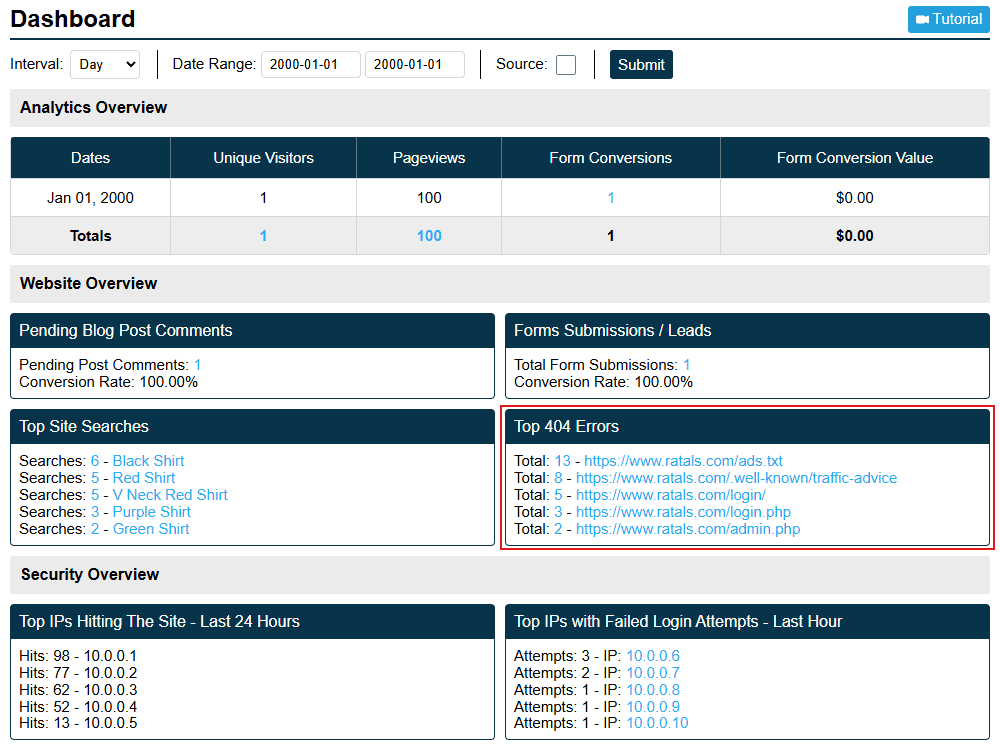
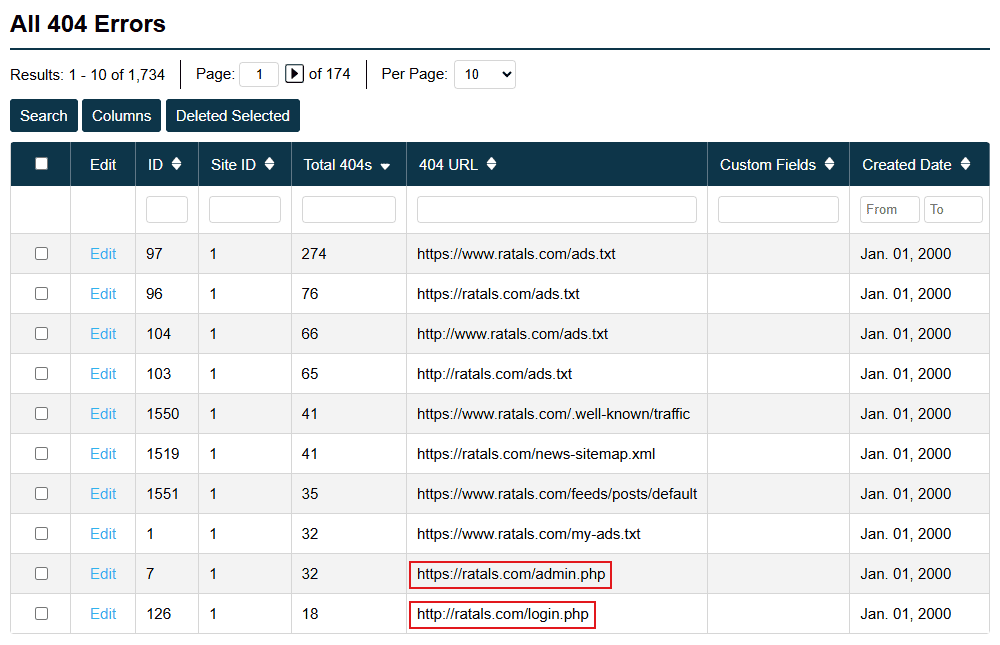
Every 404 request on your site is a data point. Ratals captures every one of them and gives you the visibility to act on what they reveal — whether that is a broken link that needs fixing, a URL that should be redirected, content visitors expected to find, or automated bots probing your site for weaknesses.

404 Errors Dashboard

See Every URL Visitors Are Trying to Reach

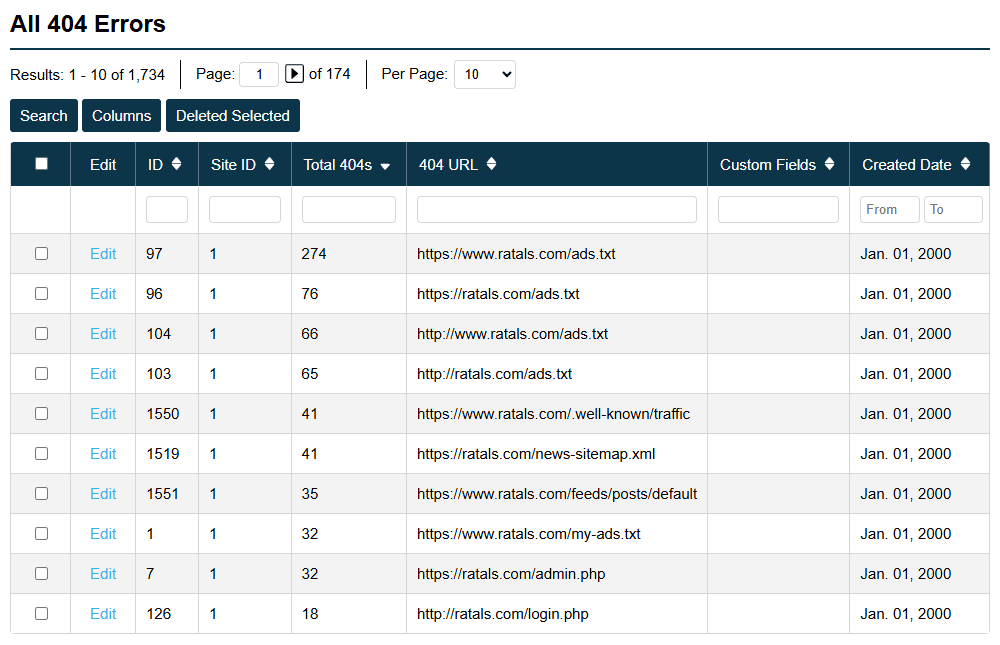
Every time a visitor, search engine, or bot requests a URL that does not exist, Ratals records it. Over time this builds a clear picture of broken internal links, outdated backlinks, mistyped URLs, expired campaign pages, and content gaps where visitors expected something to be but found nothing.

From the 404 dashboard you can identify which missing URLs are being requested most frequently, create redirects directly from the report, and recover traffic that would otherwise be lost quietly in the background.

Frequently Requested Missing Urls 404 Errors

Security Visibility Through 404 Activity

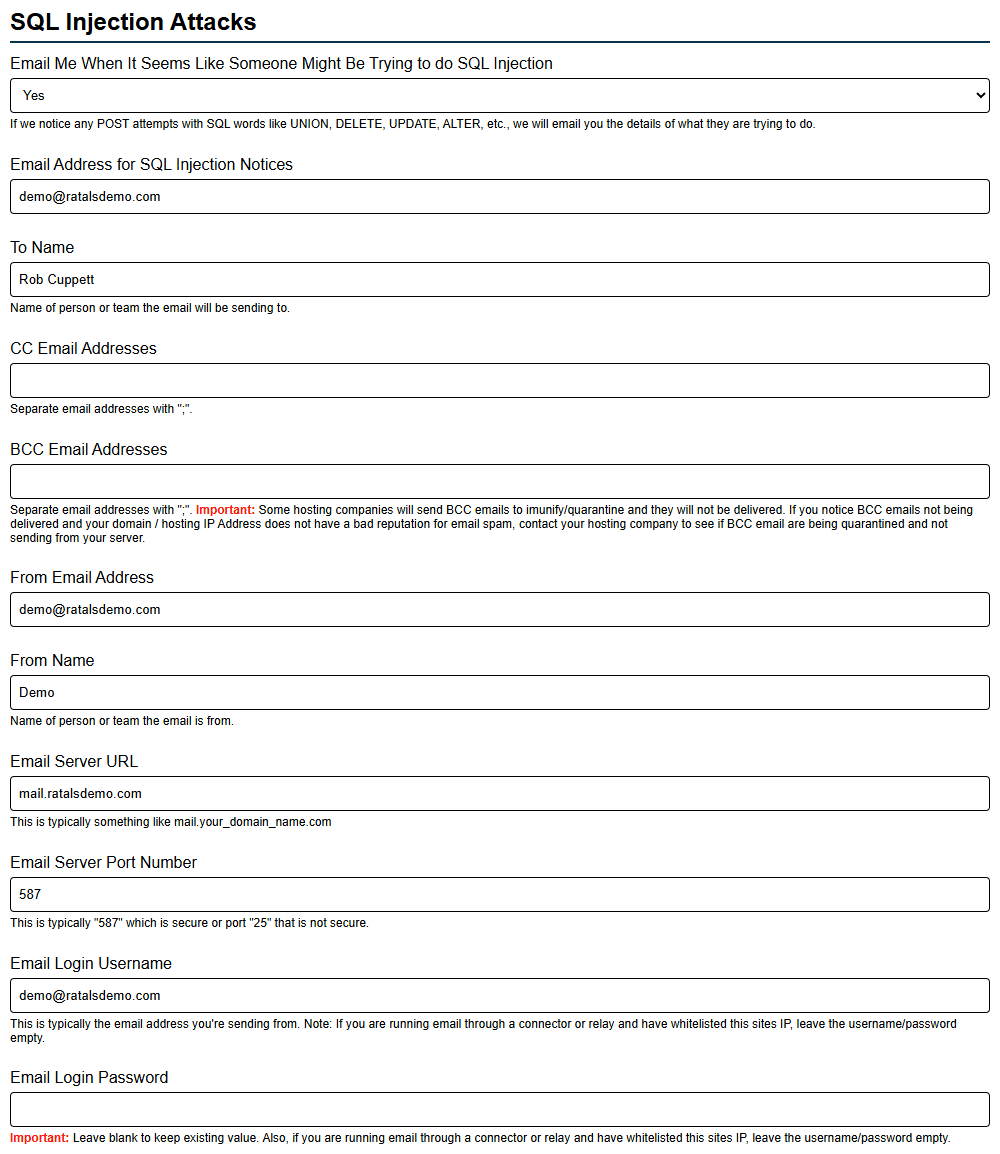
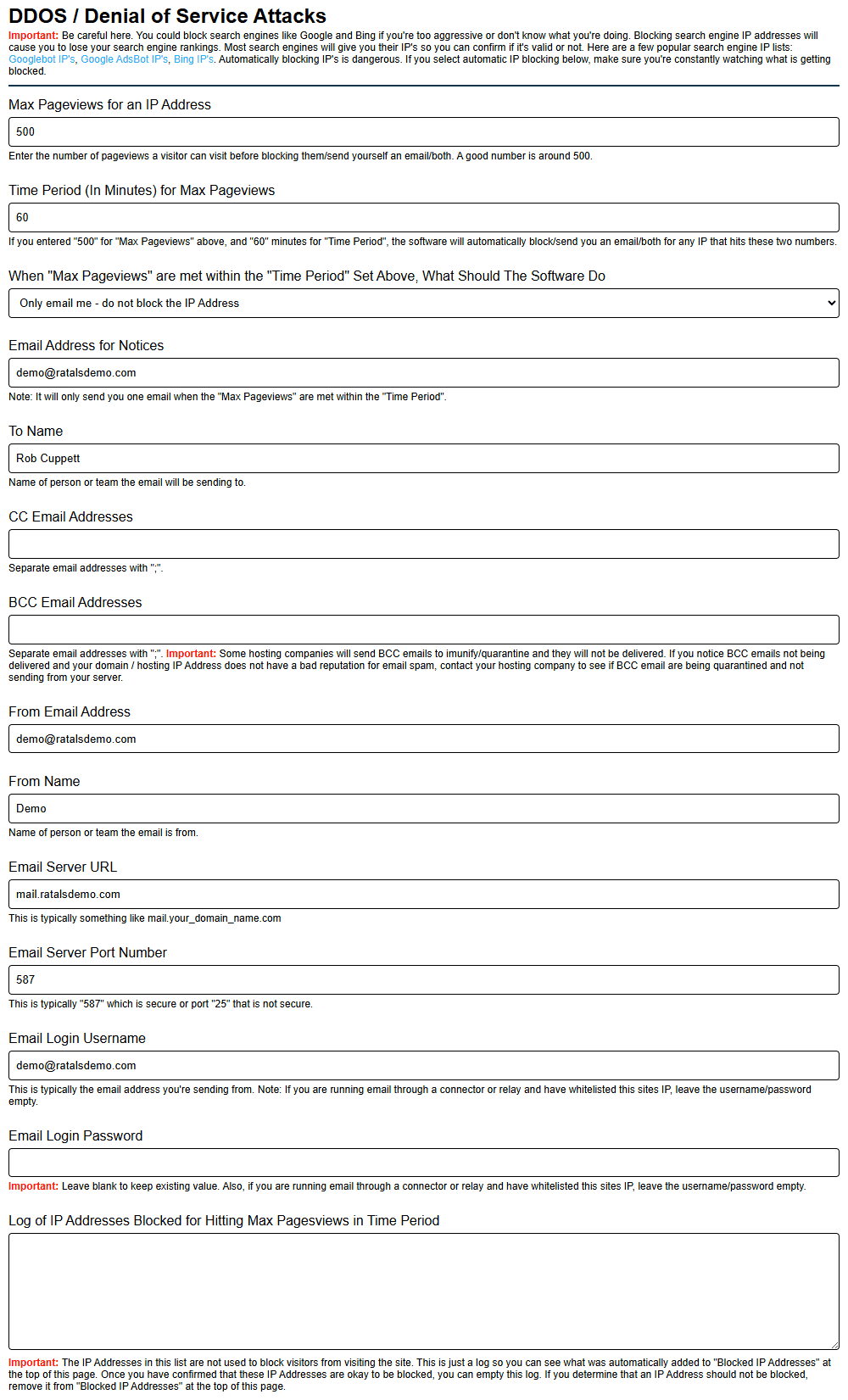
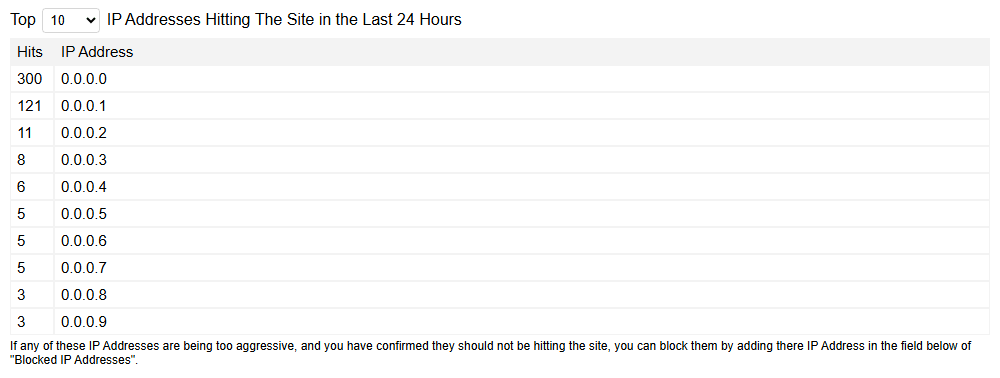
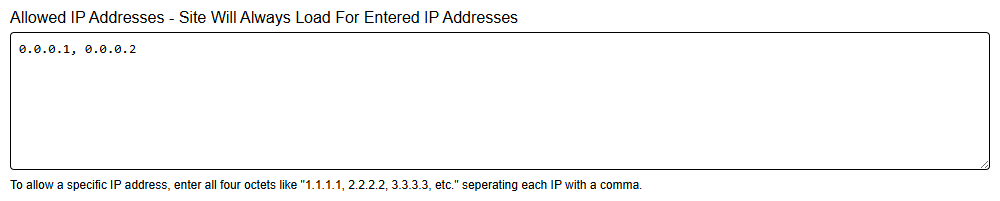
Automated bots continuously scan websites looking for vulnerabilities — probing for admin login pages, known platform files, configuration files, backup files, and common software paths. Almost all of these requests land on 404s. By reviewing your 404 activity in Ratals you can quickly spot patterns that indicate automated scanning or malicious behavior, giving you early visibility into what external systems are attempting to access before anything is ever found.

Security Related 404 Requests

Turn Missing URLs Into Actionable Data

Some 404s reveal broken links. Some reveal SEO opportunities. Some reveal content gaps. Some reveal security threats. Ratals surfaces all of it in one place — turning what is typically an ignored server log into a practical tool for improving site quality, recovering lost traffic, strengthening content strategy, and maintaining security awareness across every site you manage.

Forms Builder

The Ratals Forms Builder is built directly into the CMS. Create, manage, and deploy unlimited forms from the admin area — no third-party services, no plugins, no additional costs.

Form Builder Dashboard

Create Unlimited Forms

Every business collects different information. Ratals lets you create as many forms as you need — contact forms, quote request forms, lead generation forms, product inquiry forms, support requests, consultation requests, newsletter signups, restock notifications, custom applications, and anything else your business requires. Each form is configured independently based on exactly what you need to collect.

Reusable Form Fields

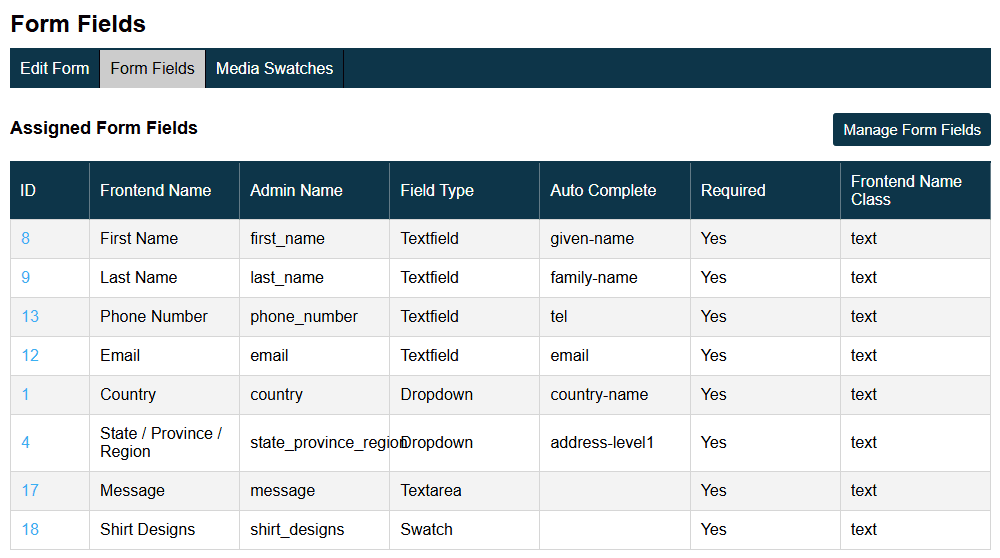
Fields can be created once and reused across as many forms as you need. Name fields, email fields, phone fields, address fields, company fields, product selection fields — build them once and pull them into any form. When a field needs updating, change it in one place and every form using it updates automatically.

Advanced Product & Quote Request Forms

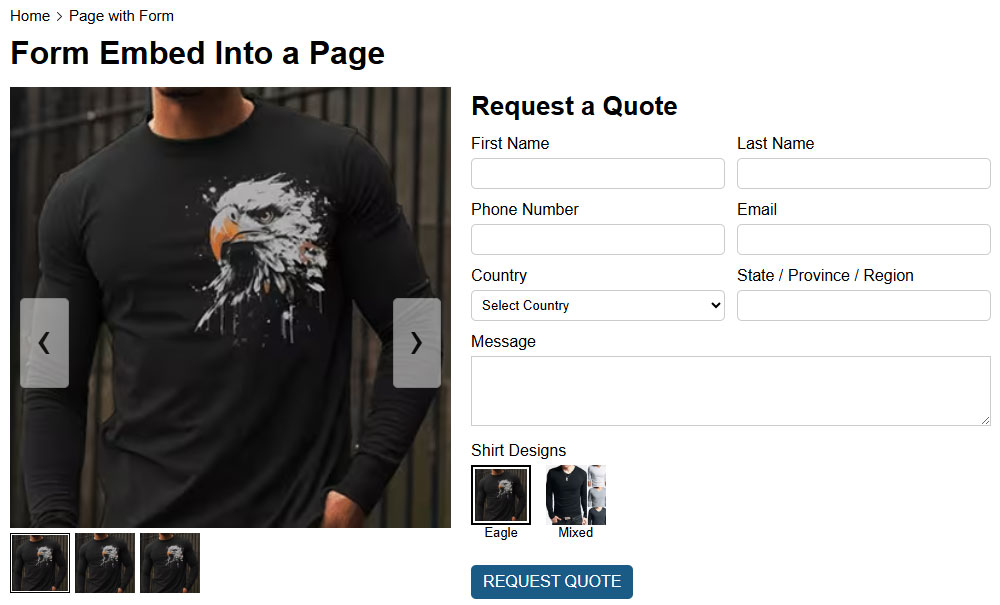
For businesses that sell products or custom solutions, Ratals supports advanced form experiences that let visitors interact with products before submitting. Quote request forms can include product images, color swatches, size options, material choices, product variations, and custom configuration options. When the form is submitted, all selected options are included with the submission — giving your sales team full context from the first interaction.

Product Quote Request Form With Swatches

Use Forms Anywhere on Your Website

Once a form is created it can be embedded anywhere on the site using a simple short code:

php echo form_id(1);

The same form can appear across multiple URLs without duplication — on landing pages, product pages, documentation, resource centers, or anywhere else it is needed. Forms integrate fully with the Ratals template system and Sub-Item Builder, so a page built on the blank canvas template can combine a hero section, feature overview, product grid, testimonials, a lead generation form, and a call to action — all assembled and managed from within the CMS.

Media Slider Builder

The Ratals Media Slider Builder is built directly into the CMS. Create unlimited sliders and deploy them anywhere on your site — no third-party plugins, no external dependencies, no additional costs.

Media Slider Builder Dashboard

Create Unlimited Sliders

Different sections of your site need different visual experiences. Homepage hero sliders, product carousels, testimonial sliders, partner logo sliders, featured content carousels, resource center sliders, gallery sliders, case study showcases — create as many as your site requires, each configured independently and reusable wherever it is needed.

Display Controls & Responsive Layouts

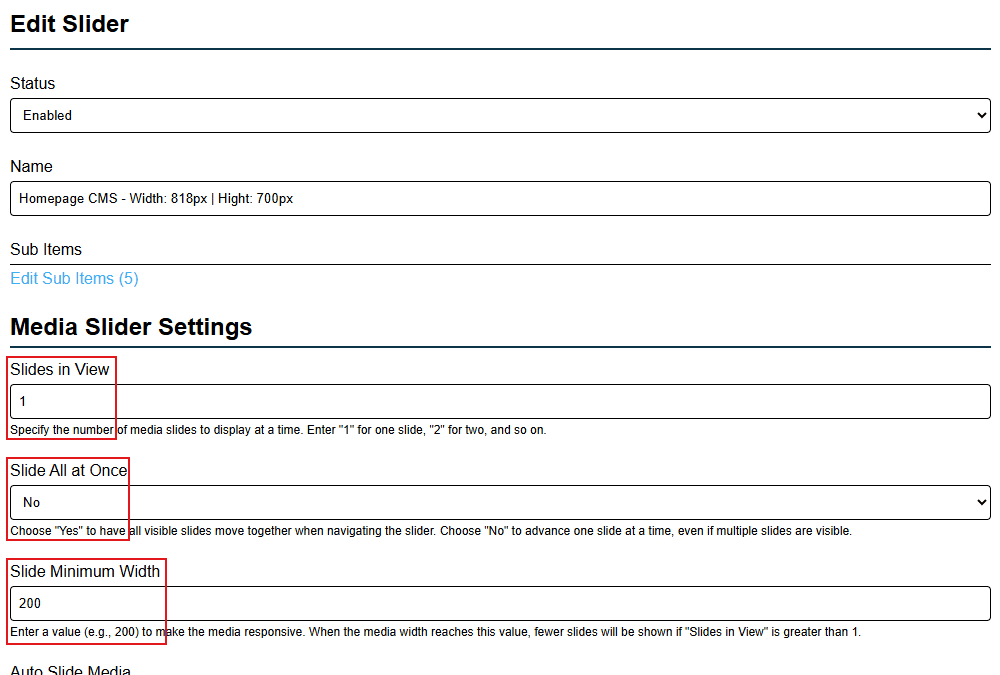
Control exactly how many slides are visible at one time — from a single large hero image to ten cards side by side. Set a minimum slide width and the slider adapts automatically as the viewport shrinks. A slider showing five cards on desktop can display two on mobile without any custom code, keeping the experience consistent across all devices.

Media Slider Builder Responsive Settings

Slide Movement, Auto Slide & Navigation Controls

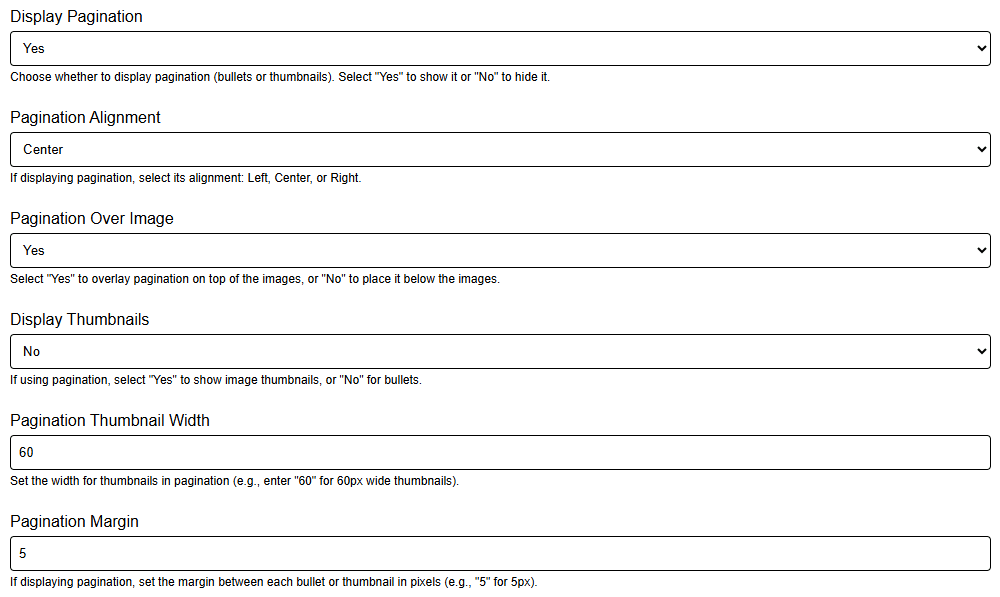
Choose to slide one item at a time or all visible items together. Enable manual navigation, automatic sliding, or both. When auto slide is on, set the pause duration and transition speed independently for each slider. Navigation options include thumbnail navigation, bullet navigation, alignment controls, and positioning on or below the media — giving you full control over how visitors interact with each slider.

Media Slider Pagination Thumbnail Settings

Performance-Focused Loading Controls

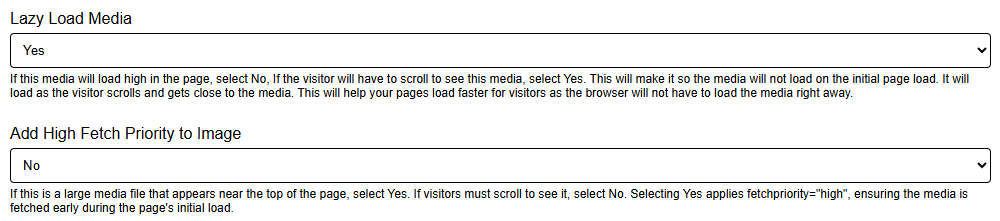
Slider media can be set to load immediately or lazy load as visitors scroll. For sliders positioned lower on the page, lazy loading reduces initial page load times by only downloading images when they are needed. For media positioned high in the layout where speed matters most, high fetch priority can be enabled to encourage the browser to load those assets first during page rendering.

Media Slider Performance Optimization Settings

Website Control Without Plugin Dependency

Ratals was built on a straightforward principle — the tools businesses commonly need to run a website should already be part of the platform. Not added on later. Not sourced from third parties. Built in from the start and designed to work together as a single system.

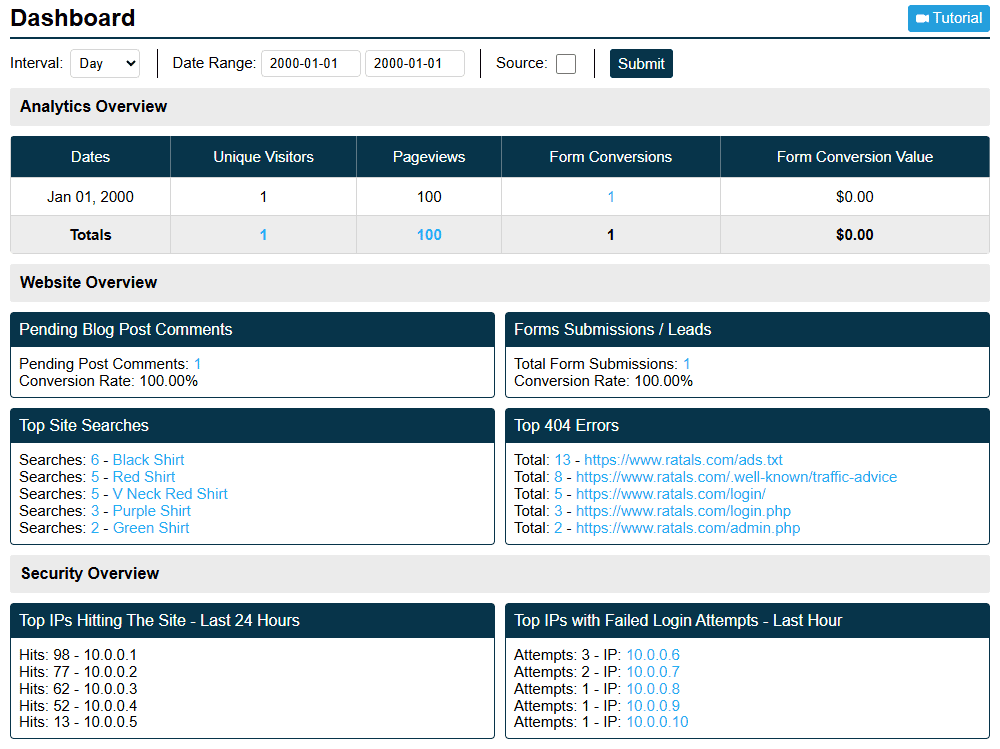
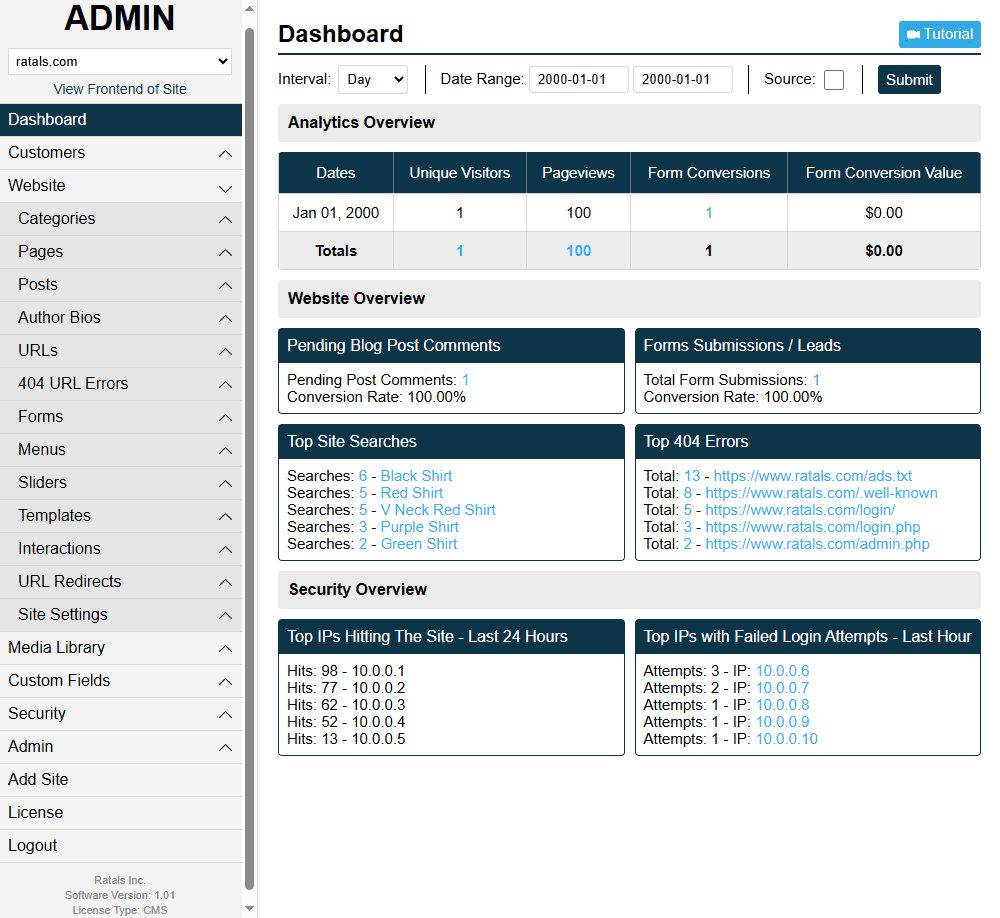
Ratals Admin Cms Dashboard With Integrated Features

Built-In Tools Instead of Add-Ons

The features covered on this page — URL management, SEO controls, internal linking intelligence, redirect management, 404 monitoring, forms, menus, sliders, caching, sitemap management, multi-site management, custom database builder, data import and export, and template management — are all part of the Ratals core. No plugins required, no third-party services, no additional licenses.

Because everything is built into the same platform, every feature is designed to work with every other feature from day one. The forms builder works with the Sub-Item builder. The redirect system works with the URL system. The caching system works with the template system. Nothing needs to be patched together and nothing needs to be kept compatible over time.

Admin Navigation With Native Cms Features

Fewer Updates, Less Complexity, Better Performance

When functionality is consolidated into a single platform, maintenance becomes simpler. One system to update, one system to manage, one consistent codebase. There are no plugin conflicts to resolve, no compatibility issues to test after every update, and no third-party release schedules affecting your site. Every component was built as part of the same system, so they stay aligned as the platform grows.

A Consistent Admin Experience

Because every feature in Ratals lives within the same platform, the admin experience stays consistent throughout. Creating URLs, managing templates, building forms, configuring redirects, reviewing 404 activity, setting up menus — the workflow is familiar regardless of which part of the system you are working in. That consistency reduces the learning curve for new team members and keeps day-to-day website management efficient.

A Platform Built to Grow With You

As your business evolves your website needs to evolve with it. Ratals provides a foundation that stays flexible as those requirements grow — with the tools to manage, organise, optimise, and expand already built in. Greater control, fewer dependencies, and an architecture designed for the long term.

Technology should adapt to your business. Your business should not have to adapt to your technology.

Built-In Software Update System

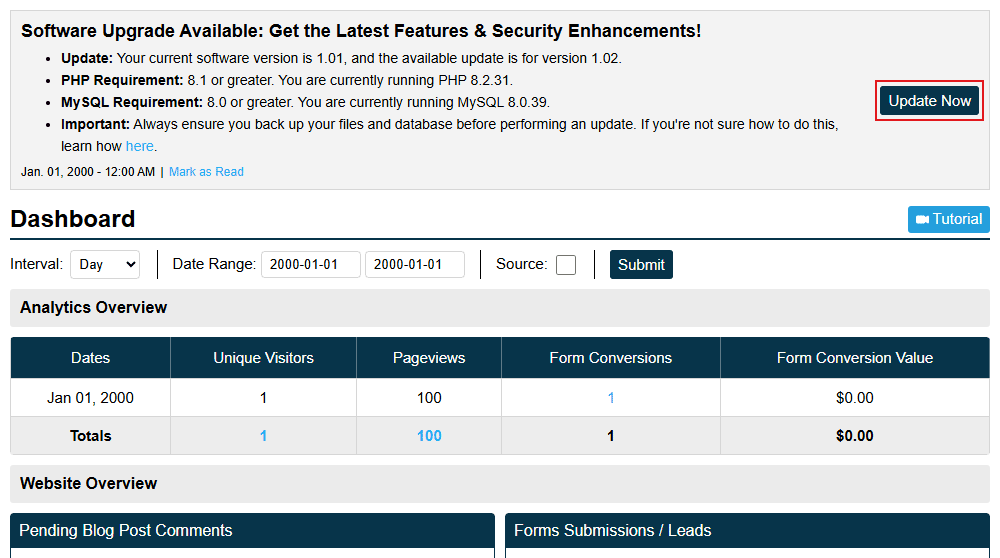
Ratals pushes software updates directly to your admin area. When a new update is available it appears in the notification system, where it stays until you are ready to act on it. If you want to dismiss it temporarily you can mark it as read and re-enable it whenever you are ready to update.

Update Notification In Admin

Update Permissions

Not every admin user should be able to push a software update. When creating an admin user you can choose whether that user has permission to see and trigger updates. Only users with update permissions will see the update controls — keeping that responsibility with the right people on your team.

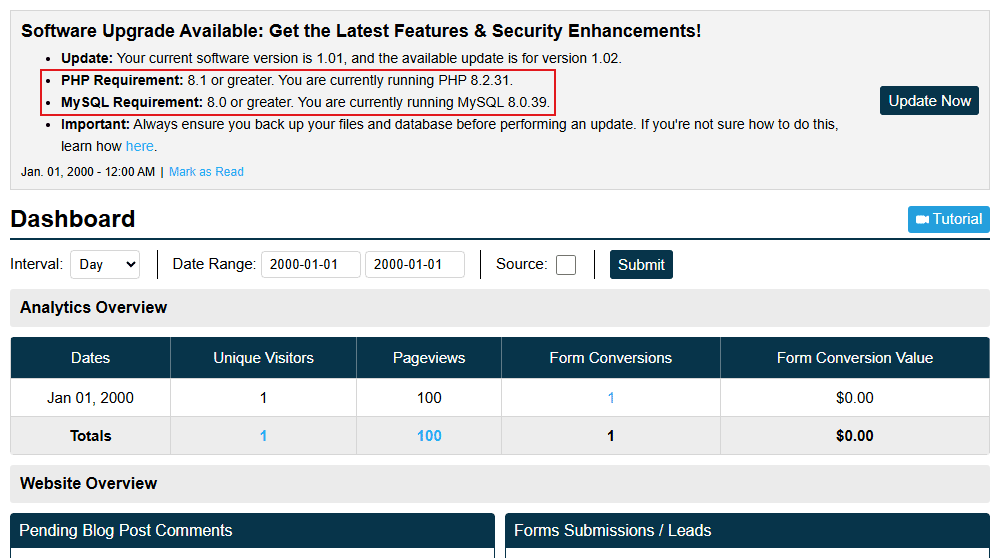
Automatic Server Compatibility Checks

Before showing the update button, Ratals automatically checks the PHP and MySQL versions running on your server against the minimum requirements for that update. If your server does not yet meet the requirements the update button stays hidden — so there is no risk of accidentally triggering an update that could break the platform. As soon as the server meets the requirements the button appears and the update is ready to run.

Update Notification Server Compatibility Check

Safe Updates That Preserve Your Customisations

When an update runs it updates all core files and database tables while keeping any custom fields you have created intact — in the same position and column order they were in before the update. Your customisations are never overwritten by a core update.

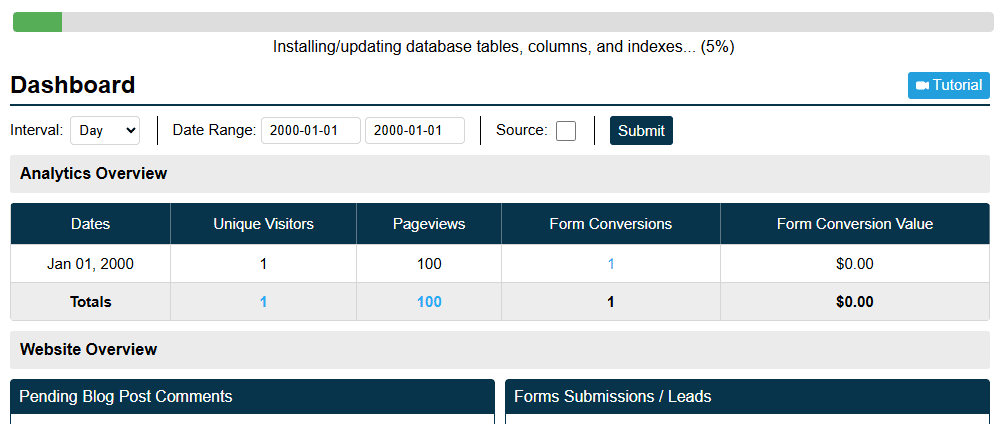
While the update runs a live status bar is visible in the admin area showing exactly how far along the update is. You can keep working while it processes and the progress is always visible so you know where things stand. When the update completes Ratals sends a notification letting you know it is done.

Software Update Progress Bar

Always on the Current Version

The update system means you can always keep your Ratals installation current without manually migrating between versions or coordinating developer work around PHP and MySQL upgrades. Updates are delivered based on what you have active — if you are running the free open-source CMS core, you will receive core updates. If you have an active subscription for Commerce, ERP, or any other package, your update will include those as well. If a subscription is cancelled, updates will continue for the core but will no longer include the packages that require an active subscription.

Why Businesses Choose Ratals

Ratals is built for businesses that want a platform where everything works together from the start — where URLs, templates, SEO, content management, internal linking, redirects, caching, forms, menus, sliders, database management, multi-site control, and software updates are all part of the same system, not assembled from disconnected tools over time.

Content Types Provide Functionality. You Control the Experience.

Every content type in Ratals comes with the functionality it needs to work. Categories handle filtering and discovery. Products handle pricing, inventory, attributes, and variants. Authors handle publishing relationships and credibility signals. Pages and posts handle structured content workflows.

What sits on top of that functionality is entirely up to you. A product page can become a full commercial hub. A category can become a resource center. An author page can become an authority profile. The underlying system behavior stays intact while the experience becomes whatever your business needs it to be.

Fewer Dependencies. More Control.

The features covered on this page — SEO tools, redirect management, 404 monitoring, internal linking intelligence, forms, menus, sliders, caching, custom database builder, data import and export, multi-site management, and the software update system — are all built into the Ratals core. One platform to manage, one system to update, one consistent admin experience throughout.

The result is fewer moving parts, fewer surprises, and more time spent building your website instead of maintaining the software behind it.

Built Around URLs.

Search engines rank URLs. Visitors bookmark URLs. Marketing campaigns promote URLs. Ratals places URLs at the center of the architecture — giving you complete control over how content is structured, how pages relate to one another, and how your site is understood by both visitors and search engines. That control makes it easier to build content ecosystems, topic clusters, commercial hubs, documentation centers, and comparison experiences that work together rather than existing as isolated sections of a website.

Built for Every Team.

Marketers can build landing pages and content hubs without waiting on development work. SEO teams have direct control over URLs, metadata, internal linking, redirects, and content relationships. Content teams have reusable layouts, templates, and structured content tools. Developers have complete control over templates, HTML, CSS, include files, database queries, and custom functionality. Everyone works from the same platform while keeping the flexibility they need for their role.

Built to Scale.

The website you launch today will not be the same website you manage three years from now. Products evolve, services expand, content libraries grow, and customer expectations increase. Ratals supports that growth without forcing repeated redesigns or platform migrations. Content types keep providing their functionality. Templates keep controlling presentation. Sub-Items keep controlling content structure. Each layer stays flexible and independent so the site evolves naturally alongside the business.

Open Source at the Core.

The Ratals CMS core is licensed under Apache 2.0 — free to use, modify, and deploy commercially without restriction. Start with the core and expand into Commerce, ERP, AI-powered tools, and more as your business grows. Whatever level you are running, the built-in update system keeps your installation current automatically.

Ready to Build?

Download the Ratals CMS core free and start building. Create any URL structure, build any experience, and manage everything from a single connected platform — with the tools to scale into ecommerce, ERP, inventory management, analytics, and AI as your business evolves.

Download Ratals CMS Free

Discover Ratals eCommerce →

This site uses cookies to deliver its services and to analyze traffic. Learn more on our Cookie Policy and Privacy Policy.